Back to Blog
Guides
4 min read

How to Convert Your PubMed Search to Embase and Cochrane (Database Search Translator)

A systematic review that searches only PubMed misses a substantial portion of the published literature. Converting your PubMed search to Embase, Cochrane, and CINAHL is essential but the syntax differences are significant. This guide shows you how.

Dr. Sarah Mitchell

April 20, 2026

Want to try this yourself? Use our free research tools, no sign-up required.

Key Takeaways

Multi-database searching is required for systematic reviews; PubMed alone is insufficient.

Each major database uses different controlled vocabulary and field tag syntax.

MeSH terms must be converted to Emtree equivalents for Embase.

Always explode controlled vocabulary terms using the correct modifier (/exp, +, explode all trees).

Document every search string, date, and result count for transparent reporting.

Our [Database Search Translator](/resources/database-search-translator) automates the most time-consuming translation steps.

Multi-database searching is not optional in a systematic review. Every major reporting guideline, including PRISMA 2020 and the Cochrane Handbook, requires searches across multiple bibliographic databases. PubMed covers approximately 37 million records but has limited coverage of conference proceedings, gray literature, and non-English journals. Embase captures broader European and pharmacological literature. Cochrane's CENTRAL indexes controlled trials not always found in PubMed. CINAHL covers nursing and allied health. Web of Science spans science, social sciences, and humanities. Scopus provides the largest abstract and citation database.

Each database uses a different controlled vocabulary, different syntax rules, and different conventions for Boolean operators, proximity searching, truncation, and field codes. A search that works in PubMed will fail in every other database unless you translate it deliberately.

Try our free Cochrane search translator to convert your PubMed search string automatically.

Why Direct Copy-Paste Fails

A typical PubMed search uses MeSH (Medical Subject Headings) terms and free-text terms with field tags like [MeSH] and [tiab]. If you paste this into Embase, [MeSH] is not recognized. Embase uses Emtree with different term names and hierarchies. The [tiab] tag does not exist in Embase; it uses :ti,ab instead. Web of Science does not support any controlled vocabulary at all. Scopus uses its own field codes (TITLE-ABS-KEY) that look nothing like PubMed tags.

Running an untranslated string typically generates errors, retrieves zero results, or silently drops controlled vocabulary terms while retrieving only free-text matches, introducing retrieval bias into your review.

MeSH vs Emtree: Key Differences
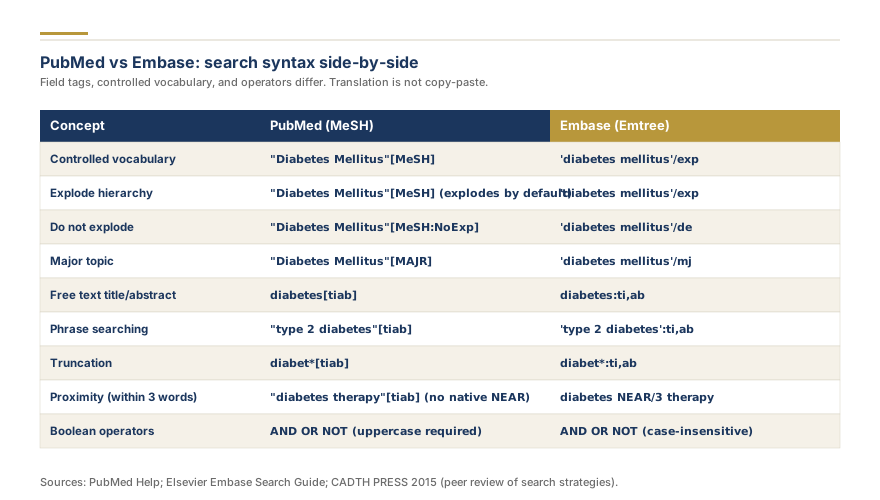
Side-by-side syntax grid for PubMed MeSH and Embase Emtree
PubMed vs Embase: search syntax side-by-side

NLM MeSH and Embase Emtree both organize biomedical concepts in hierarchical trees, but term names and explosion behaviors differ substantially. Myocardial Infarction (MeSH) becomes heart infarction (Emtree). Neoplasms becomes neoplasm. Diabetes Mellitus, Type 2 (MeSH) maps to non insulin dependent diabetes mellitus (Emtree).

In Embase, controlled terms use /exp for explosion: diabetes mellitus/exp. Without /exp, Embase searches only the exact descriptor without narrower terms. PubMed explodes MeSH terms by default, so forgetting the /exp modifier in Embase is one of the most common translation errors.

Cochrane CENTRAL Syntax

MeSH descriptor searches follow the format: [MeSH descriptor: [term] explode all trees]. Field restrictions use :ti for title, :ab for abstract, and :kw for keywords. Boolean operators must be capitalized (AND, OR, NOT). Cochrane does not support Emtree or CINAHL headings.

CINAHL Syntax

CINAHL uses EBSCO as its platform. Controlled vocabulary follows: (MH "term+") where + indicates explosion. Title and abstract fields use TI and AB, capitalized. TX searches all text fields.

For building your initial strategy, see our build your search strategy. For developing Boolean queries, read our Boolean search strategy guide.

Web of Science and Scopus Syntax

Web of Science has no controlled vocabulary. Key field codes: TS (Topic), TI (Title), AB (Abstract). A PubMed "diabetes mellitus"[tiab] becomes TS=("diabetes mellitus"). Supports NEAR/x proximity and lemmatization by default.

Scopus uses TITLE-ABS-KEY() for title, abstract, and author keywords. Supports W/n (within n words, ordered) and PRE/n (preceding within n words) proximity operators.

Both databases lack controlled vocabulary, so translation involves dropping MeSH terms and expanding free-text synonyms. Without this expansion, your search underperforms because you lose the automatic mapping that MeSH provides.

PsycINFO (APA PsycInfo) Syntax and Thesaurus Terms

APA PsycInfo uses the APA Thesaurus of Psychological Index Terms, distinct from both MeSH and Emtree. On EBSCO, controlled terms use (DE "term"). Key MeSH mapping differences: "Depressive Disorder" becomes "Major Depression" and "Cognitive Behavioral Therapy" becomes "Cognitive Behavior Therapy" (note spelling). For systematic reviews in psychology or behavioral health, PsycINFO is essential. Failing to search it can mean missing 20% or more of relevant studies.

ProQuest Dissertations Search Syntax

ProQuest Dissertations and Theses (PQDT) is the primary source for unpublished dissertations, an important gray literature source for reducing publication bias. Field codes: ti (title), ab (abstract), su (subject terms), noft (all fields except full text). Supports truncation with *, wildcard with ?, and phrase searching with double quotes. No controlled vocabulary.

For more on gray literature databases, see our guide on gray literature sources for systematic reviews.

Boolean Operator Differences Across Platforms

PubMed processes Boolean operators left-to-right. Embase (Ovid) processes OR first, then AND, then NOT. This means A AND B OR C is interpreted as A AND (B OR C) in Ovid but (A AND B) OR C in PubMed. Always use explicit parentheses. Scopus requires AND NOT (not just NOT). CINAHL and PsycINFO (EBSCO) use standard precedence.

Proximity Operators by Database
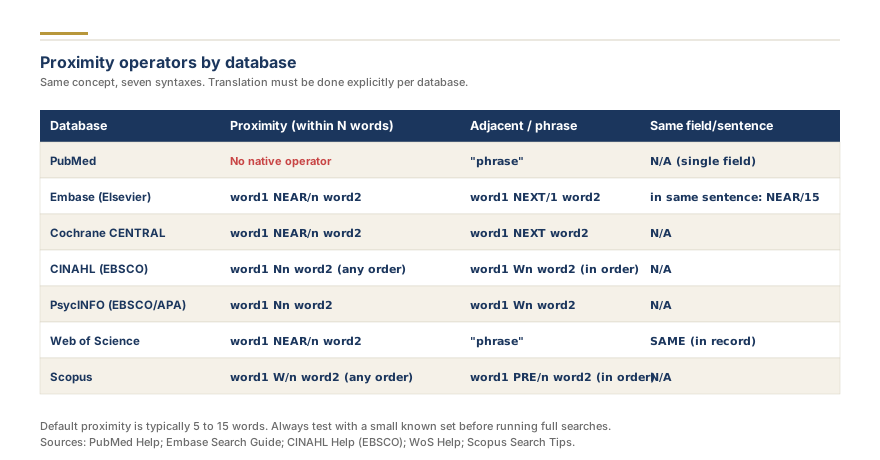
Proximity operators across PubMed, Embase, Cochrane, CINAHL, Web of Science, and Scopus
Proximity operators by database

Proximity operators find terms near each other, more precise than Boolean AND.

DatabaseOperatorExample
PubMedNot supportedN/A
Embase (Ovid)ADJn (ordered)pain ADJ3 management
Web of ScienceNEAR/n (any order)pain NEAR/3 management
ScopusW/n (ordered), PRE/npain W/3 management
CINAHL/PsycINFONn (any order), Wn (ordered)pain N3 management

PubMed does not support proximity searching. If your PubMed strategy uses phrase searching, use proximity operators in other databases to capture variations.

Need help with your systematic review?

Our team builds comprehensive search strategies, handles screening across databases, and delivers PRISMA 2020-compliant systematic reviews.

Truncation and Wildcard Differences

FeaturePubMedEmbase (Ovid)Web of ScienceScopusCINAHL/PsycINFO
Truncation* (unlimited)* or $ (limited)* (unlimited)* (unlimited)* (unlimited)
Single char wildcardNot supported????
Internal truncationNot supportedSupportedNot supportedNot supportedSupported

Key pitfall: In Ovid Embase, $ truncates to a limited number of characters, while * is unlimited. In Web of Science, $ represents zero or one character. Mixing these up will over-retrieve or miss records. PubMed's "randomi*" works in most databases to capture randomized, randomised, randomization, and randomisation.

Step-by-Step Conversion Process

Step 1: Audit your PubMed search line by line. Separate MeSH terms, free-text terms, and filters.

Step 2: For each MeSH term, find the equivalent controlled vocabulary term: Emtree browser for Embase, APA Thesaurus for PsycINFO, CINAHL headings for CINAHL. For Web of Science and Scopus, expand free-text synonyms instead.

Step 3: Convert field tags using this reference table.

PubMedEmbase (Ovid)CochraneCINAHLWeb of ScienceScopusPsycINFO
[tiab].ti,ab:ti,abTI or ABTS=TITLE-ABS-KEY()TI or AB
[MeSH]/expMeSH descriptor explode(MH "term+")N/AN/A(DE "term")
[pt].ptN/A(PT "type")DT=DOCTYPE()(ZZ "type")

Step 4: Convert Boolean operators and parenthetical grouping, paying attention to precedence differences.

Step 5: Replace any proximity operators or wildcards using the translation tables above.

Step 6: Run a test search. Differences over 30% from PubMed results warrant investigation.

Step 7: Document every search string, date, interface, and result count.

Our Database Search Translator automates steps 2 through 5.

Complete Worked Example: One Search Translated to Five Databases

A simplified search for exercise interventions for type 2 diabetes, translated across five databases. Line 1 is the population concept, line 2 is the intervention, line 3 is the study design filter.

PubMed: "Diabetes Mellitus, Type 2"[MeSH] OR "type 2 diabetes"[tiab] / "Exercise"[MeSH] OR exercise[tiab] OR "physical activity"[tiab] / "Randomized Controlled Trial"[pt] OR randomized[tiab]

Embase (Ovid): non insulin dependent diabetes mellitus/exp OR "type 2 diabetes".ti,ab / exercise/exp OR kinesiotherapy/exp OR exercise.ti,ab / randomized controlled trial.pt OR randomized.ti,ab

Web of Science: TS=("type 2 diabetes" OR "T2DM" OR "non-insulin dependent diabetes" OR "NIDDM") / TS=(exercise OR "physical activity" OR "exercise therapy" OR "physical training") / TS=(randomized OR randomised OR "controlled trial")

Scopus: TITLE-ABS-KEY("type 2 diabetes" OR "T2DM" OR "non-insulin dependent diabetes") / TITLE-ABS-KEY(exercise OR "physical activity" OR "exercise therapy") / TITLE-ABS-KEY(randomized OR randomised OR "controlled trial")

PsycINFO: (DE "Diabetes Mellitus") OR TI("type 2 diabetes") OR AB("type 2 diabetes") / (DE "Exercise") OR TI(exercise OR "physical activity") OR AB(exercise OR "physical activity") / TI(randomized OR randomised) OR AB(randomized OR randomised)

Each set of three lines is combined with AND. Notice how Web of Science and Scopus expand free-text synonyms to compensate for lacking controlled vocabulary, while PsycINFO uses APA Thesaurus terms (DE) that differ from MeSH.


Need professional help translating your search strategy across databases? Our team handles multi-database search development, PRESS peer review, and PRISMA 2020 compliant documentation. get your project priced and let Research Gold systematic review services manage the technical complexity of your search process.


The PRESS Checklist for Validating Translated Searches

McGowan et al. (2016) developed the Peer Review of Electronic Search Strategies (PRESS) checklist, the gold standard for search quality. PRESS evaluates six elements: (1) translation of the research question, (2) Boolean and proximity operators, (3) subject headings, (4) text word searching including synonyms and truncation, (5) spelling, syntax, and line numbers, and (6) limits and filters consistency across databases.

For Cochrane or Campbell reviews, peer review of the search strategy is mandatory. Rethlefsen et al. (2021) published the PRISMA-S extension, a 16-item checklist for reporting search strategies, requiring database name, interface, date searched, complete strategy, limits, and result counts.

Documenting Search Translations for PRISMA 2020

PRISMA 2020 (Item 7) requires full search strategies in a supplementary appendix. For each database, include: database name and platform (e.g., Embase via Ovid), date searched, each search line with its complete string, and the number of results per line and total. The search must be reproducible: a reader should be able to enter your exact strings and retrieve approximately the same number of records.

Your methods section should state all databases searched with platform names, the date range, who developed the search, whether it was PRESS peer reviewed, and how the PubMed strategy was adapted for other databases. If you used the online search strategy tool or Database Search Translator, note this along with any manual modifications.

Common Translation Errors

Not exploding controlled terms. Forgetting /exp in Embase or + in CINAHL causes you to miss all narrower terms in the hierarchy.

Using MeSH terms directly in Embase. Embase mapping is unreliable. Always look up the correct Emtree term.

Ignoring operator precedence. A search that works in PubMed (left-to-right) may retrieve different results in Ovid (OR-first) without parentheses.

Forgetting synonym expansion. When translating to Web of Science or Scopus, add synonyms that MeSH explosion would have captured: alternate spellings (randomized/randomised), related terms, and abbreviations.

Neglecting filter translation. PubMed's [pt], Embase's .pt, and Web of Science's DT= use different labels for the same publication types.

When to Hire a Medical Librarian vs Doing It Yourself

Hire a medical librarian when your review targets Cochrane or Campbell, involves more than three databases with controlled vocabularies, or needs formal PRESS peer review.

Do it yourself when the topic is straightforward, you have experience with the target databases, or you use validated tools like our Database Search Translator for syntax conversion.

Regardless of approach, always have the search peer reviewed. McGowan et al. (2016) found errors in more than half of submitted strategies. For an overview of how search decisions feed into your overall review, read our search strategy guide for systematic reviews.

Minimum for health and biomedical reviews: PubMed, Embase, and Cochrane CENTRAL. Add CINAHL for nursing topics, PsycINFO for psychology and behavioral health, ERIC for education, and Web of Science or Scopus for broader interdisciplinary coverage. The Cochrane Handbook recommends at least CENTRAL, MEDLINE, and Embase for intervention reviews.

Searching more databases increases sensitivity but also increases duplicates. Use reference management software like EndNote, Zotero, or Covidence to deduplicate efficiently.

Key Takeaways

  • Multi-database searching is required for systematic reviews; PubMed alone is insufficient.
  • MeSH terms must be converted to Emtree equivalents for Embase and APA Thesaurus terms for PsycINFO.
  • Web of Science and Scopus have no controlled vocabulary; expand free-text synonyms to compensate.
  • Always use explicit parentheses to avoid operator precedence errors across platforms.
  • Truncation symbols (*, $, ?, #) have different meanings across databases.
  • Use the PRESS checklist (McGowan et al., 2016) to validate every translated search.
  • Follow PRISMA 2020 and PRISMA-S (Rethlefsen et al., 2021) for documenting strategies.
  • Search ProQuest Dissertations and gray literature to reduce publication bias.
  • Our Database Search Translator automates the most time-consuming translation steps.

Need expert help with your systematic review or meta-analysis? Our team handles multi-database search development, translation, and PRISMA-compliant documentation. Get a free quote today.

Frequently Asked Questions

6
Each database uses different controlled vocabulary and syntax. An untranslated PubMed string will produce errors, partial results, or silently omit controlled vocabulary matches.
MeSH is PubMed's controlled vocabulary (National Library of Medicine). Emtree is Embase's (Elsevier). Both organize biomedical concepts hierarchically but with different term names and scope.
Search the Emtree browser in the Embase interface. Our [Database Search Translator](/resources/database-search-translator) handles common mappings automatically.
Not every review, but it is essential for nursing, allied health, primary care, rehabilitation, and patient education topics.
Record database name, interface, complete search string, date, and number of records retrieved. Present in a supplementary table per PRISMA 2020 checklist item S1.
Check that all controlled terms use /exp, that Emtree terms are correct, and that field tags have been converted properly. Need help with your systematic review or meta-analysis? [Get a free quote](/get-a-quote) from our team of PhD researchers.
Share

Found this useful? Share it with your colleagues.

Need help with your systematic review?

Our team builds comprehensive search strategies, handles screening across databases, and delivers PRISMA 2020-compliant systematic reviews.

Explore our Systematic Review Service, handled end-to-end by a PhD methodologist.

Systematic Review Support

Building Your Search Strategy? We Can Run the Whole Review.

From protocol to PRISMA flow diagram, our PhD team handles database searches, screening, data extraction, and a publication-ready manuscript. Every step, done right.

Our promise: Free rework on search, screening, or synthesis if reviewers push back.

4.9 / 5Quote within a few hoursPRISMA 2020 + Cochrane HandbookPhD methodologistConfidential by default
Chat on WhatsApp now
DS

Written by

Dr. Sarah Mitchell

PhD, Biostatistics & Research Methodology
Systematic Review MethodologyMeta-AnalysisBiostatistics

Dr. Sarah Mitchell holds a PhD in Biostatistics from Johns Hopkins Bloomberg School of Public Health and has over 15 years of experience in systematic review methodology and meta-analysis. She has authored or co-authored 40+ peer-reviewed publications in journals including the Journal of Clinical Epidemiology, BMC Medical Research Methodology, and Research Synthesis Methods. A former Cochrane Review Group statistician and current editorial board member of Systematic Reviews, Dr. Mitchell has supervised 200+ evidence synthesis projects across clinical medicine, public health, and social sciences.

Need professional help with your systematic review or meta-analysis? Get a free quote from our team of PhD researchers.

Building Your Search Strategy? We Can Run the Whole Review.

From protocol to PRISMA flow diagram, our PhD team handles database searches, screening, data extraction, and a publication-ready manuscript. Every step, done right.

Will your review include a meta-analysis? We run the systematic review and the pooled analysis in one project. Quote my review + meta-analysis

Quote within a few hours. Pay only after you approve your quote. Unlimited revisions within your agreed scope. Confidential by default.