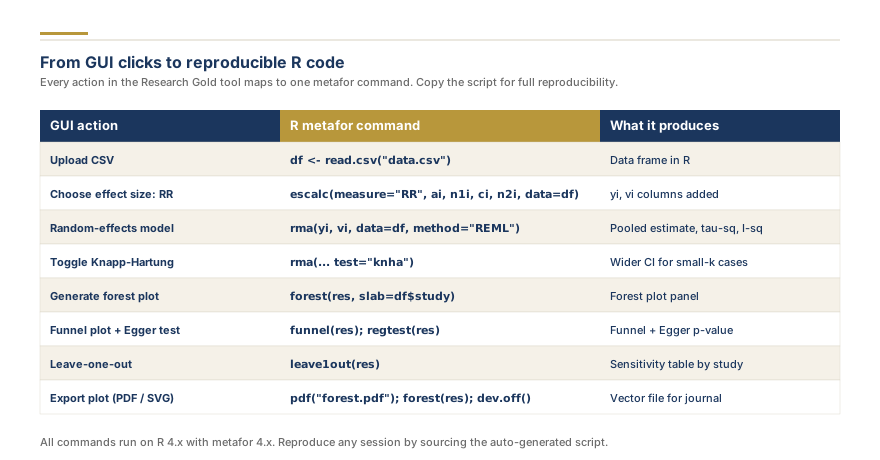
Reproducibility is no longer optional in research synthesis. Journal editors, peer reviewers, and systematic review protocols increasingly require that every analytical decision be documented in code that others can audit, re-run, and verify. If you have been running your meta-analysis through a graphical interface, you already understand the statistics. What you need now is the reproducible meta-analysis R code equivalent, line by line, so every reviewer and co-author can replicate your findings independently.
Our free tools at Research Gold auto-generate ready-to-run metafor R code the moment you enter your data. This guide covers every core function, customization technique, and best practice for building a shareable R script.
Why Reproducibility Has Become Non-Negotiable
The replication crisis has made method transparency a gatekeeping criterion at major journals. The PRISMA 2020 statement (Page et al., 2021) emphasizes transparency of analytical choices, and many Cochrane Handbook protocols mandate that R or Stata code be deposited alongside the final review. Journals such as Nature, The BMJ, and The Lancet now enforce code-sharing policies that reject manuscripts without a reproducible pipeline.
Reproducible code also protects you. When a reviewer asks you to exclude a single study and re-run the analysis, a well-commented R script lets you answer in minutes rather than days.
Understanding the metafor Package Architecture
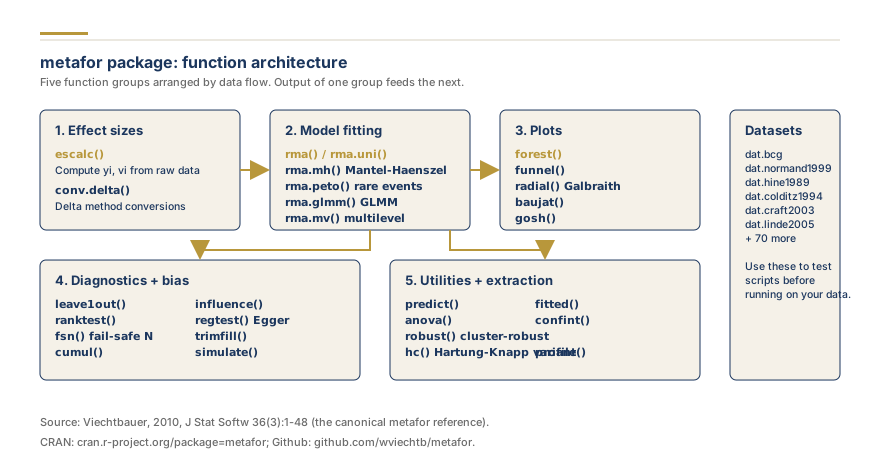
metafor, developed by Wolfgang Viechtbauer (2010), is the most widely cited R package for meta-analysis on CRAN. The R Core Team maintains the language, while Viechtbauer provides regular updates tracking evolving standards.
escalc(): Computing Effect Sizes
Before fitting any model, you need standardized effect sizes and their sampling variances. The escalc() function handles this conversion:
library(metafor)
dat <- escalc(measure = "SMD",
              m1i = mean_treat, sd1i = sd_treat, n1i = n_treat,
              m2i = mean_ctrl, sd2i = sd_ctrl, n2i = n_ctrl,
              data = raw_data)
The measure argument accepts over 30 effect size types including "SMD", "OR", "RR", "COR", and "ZCOR". The function creates two columns: yi (computed effect size) and vi (sampling variance). Our free Cohen's d calculator generates this code block with your data pre-filled.
rma(): Your Model Engine
Every meta-analysis in metafor starts with rma():
res <- rma(yi, vi, data = dat, method = "REML")
summary(res)
The method argument specifies the heterogeneity estimator, with "REML" (restricted maximum likelihood) as best practice per the Cochrane Handbook (Higgins et al., 2023). Try our free forest plot creator to auto-generate this code with your own data.
forest(), funnel(), and metabias()
forest() produces the visualization. funnel() plots effect sizes against precision for publication bias assessment. metabias() runs formal asymmetry tests (Egger's regression, Begg's rank correlation, Peters' test). Generate configured plot scripts with our build a funnel plot.
Complete R Script Template for Random-Effects Meta-Analysis
Below is a complete, copy-ready R script following the workflow recommended in the Cochrane Handbook and by Viechtbauer (2010):
# ============================================================
# Reproducible Random-Effects Meta-Analysis
# Author: [Your Name]  |  Date: [Today's Date]
# Software: R + metafor package
# ============================================================

library(metafor)

# Load data
dat <- data.frame(
  study  = c("Smith 2018","Jones 2019","Lee 2020","Garcia 2021","Patel 2022"),
  mean_t = c(12.4, 15.1, 11.8, 14.2, 13.6),
  sd_t   = c(3.2, 4.1, 2.9, 3.8, 3.5),
  n_t    = c(45, 62, 38, 54, 71),
  mean_c = c(10.1, 12.8, 10.5, 11.9, 11.2),
  sd_c   = c(3.5, 3.9, 3.1, 4.0, 3.3),
  n_c    = c(43, 58, 40, 52, 68))

# Compute effect sizes (Hedges' g)
dat <- escalc(measure = "SMD",
              m1i = mean_t, sd1i = sd_t, n1i = n_t,
              m2i = mean_c, sd2i = sd_c, n2i = n_c,
              data = dat)

# Fit random-effects model
res <- rma(yi, vi, data = dat, method = "REML")
summary(res)

# Forest plot with prediction interval
forest(res, slab = dat$study, header = TRUE,
       xlab = "Standardized Mean Difference (Hedges' g)",
       addpred = TRUE)

# Funnel plot + Egger's test
funnel(res, xlab = "SMD")
metabias(res, method = "linreg")

# Leave-one-out sensitivity
leave1out(res)

# Session info for reproducibility
sessionInfo()
Replace the sample data with your own values and adjust the measure argument for your outcome type. For a broader introduction, see our complete meta-analysis in R guide.
Forest Plot Customization in metafor
Journal submissions often require specific formatting. Here is how to control every visual element of the forest plot:
forest(res, slab = dat$study,
       header = c("Study", "SMD [95% CI]"),
       xlab = "Standardized Mean Difference",
       refline = 0, addpred = TRUE, order = "obs",
       col = "navy", border = "navy", shade = TRUE,
       fonts = "serif", cex = 0.85,
       xlim = c(-3, 4), alim = c(-2, 3))

# Add pooled estimate annotation
text(-3, -1.5, pos = 4, cex = 0.75, font = 2,
     bquote(paste("Pooled SMD = ",
     .(formatC(res$beta, format="f", digits=2)),
     " (95% CI: ", .(formatC(res$ci.lb, format="f", digits=2)),
     ", ", .(formatC(res$ci.ub, format="f", digits=2)), ")")))
Key parameters: fonts accepts "serif", "sans", or "mono". cex controls text size. col and border set diamond and square colors. shade = TRUE alternates row shading. order = "obs" sorts by effect size, while "prec" sorts by precision. For interactive creation, try our browser-based forest plot.
Adding Funnel Plots and Publication Bias Tests
A robust publication bias assessment requires both visual inspection and formal tests:
# Contour-enhanced funnel plot
funnel(res, xlab = "SMD", yaxis = "sei",
       level = c(0.10, 0.05, 0.01),
       shade = c("white","gray85","gray70","gray55"),
       legend = TRUE)

# Formal tests
metabias(res, method = "linreg")  # Egger's test

# Trim-and-fill for adjusted estimate
tf <- trimfill(res)
summary(tf)
funnel(tf, xlab = "SMD")

# Fail-safe N
fsn(yi, vi, data = dat, type = "Rosenthal")
The contour-enhanced funnel plot overlays significance regions so you can distinguish publication bias from other asymmetry sources. The trim-and-fill method (Duval and Tweedie, 2000) estimates missing studies and produces an adjusted pooled estimate. For a visual approach, use our funnel plot creator.