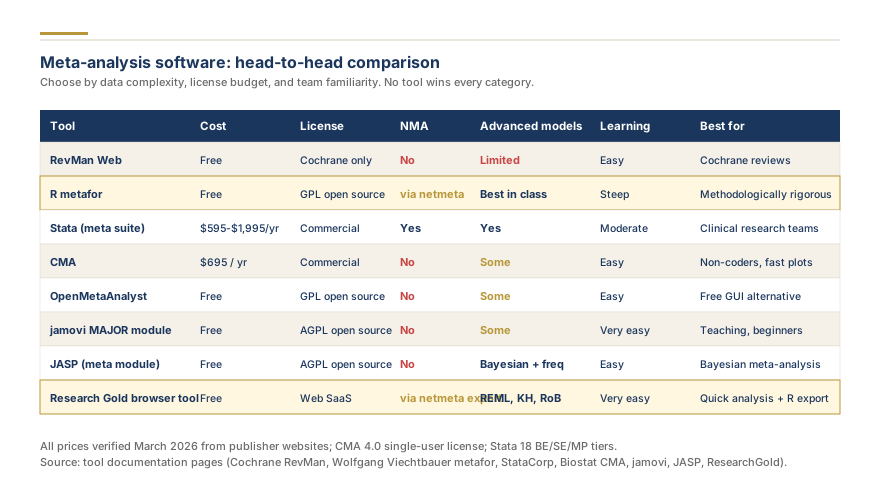
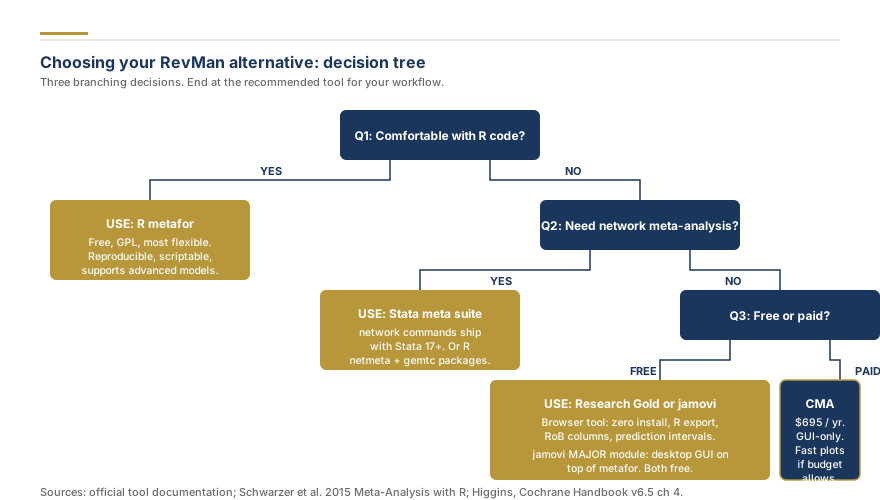
RevMan alternatives include the R metafor package (free, open-source), Stata with metan and meta commands, Comprehensive Meta-Analysis (CMA), OpenMeta[Analyst], Jamovi, JASP, and browser-based tools led by Research Gold's free meta-analysis calculators, plus Meta-Mar and MetaAnalysisOnline. RevMan (Review Manager), developed by the Cochrane Collaboration, remains the default choice for Cochrane-protocol reviews, but researchers conducting independent systematic reviews and meta-analyses increasingly need software that offers network meta-analysis, meta-regression, dose-response modeling, and full control over statistical output. This guide compares eight alternatives across pricing, analytical capabilities, learning curve, and best-use scenarios to help you select the right tool for your research. If you already know you need professional meta-analysis support, you can skip the software comparison entirely.
Just need the plots and statistics RevMan would give you? Research Gold's free browser meta-analysis tools produce journal-ready forest plots, funnel plots, and effect size conversions with no installation, free with your email.
Why Researchers Look for RevMan Alternatives
RevMan was designed with a specific purpose: to support authors producing Cochrane systematic reviews following the Cochrane Handbook methodology. That focus created three limitations that drive researchers toward alternatives.
Cochrane-centric workflow restrictions are the primary frustration. RevMan's data entry structure, risk of bias integration, and output formatting all assume a Cochrane-protocol review. Researchers conducting non-Cochrane reviews for journals like JAMA, The Lancet, BMJ, or specialty outlets find that RevMan imposes workflow constraints that do not match their project requirements. The software assumes a specific review structure, and deviating from that structure requires workarounds that slow the analysis.
Limited advanced analytical capabilities push quantitative researchers away from RevMan. The software handles standard pairwise meta-analysis with fixed-effect and random-effects models well, but it does not support network meta-analysis (comparing multiple interventions simultaneously), multivariate meta-analysis, meta-regression with continuous or categorical moderators, dose-response meta-analysis, or Bayesian meta-analysis. Researchers who need these methods must use other software regardless. For a primer on choosing between pooling models, see our guide on random-effects vs. fixed-effects meta-analysis.
Customization and reproducibility concerns matter for publication. RevMan generates standardized forest plot reading walkthrough and funnel plots, but the formatting options are limited. Journals increasingly require high-resolution, publication-ready figures with specific fonts, color schemes, and annotation styles. RevMan's graphical output cannot be customized to meet these requirements without exporting data and re-plotting in another tool. Additionally, RevMan does not produce reproducible analysis scripts, making it difficult for peer reviewers or co-authors to verify the analytical pipeline.
Understanding these limitations does not mean RevMan is a poor tool. For Cochrane reviews, it remains the standard, and its integration with the Cochrane Register of Studies and GRADEpro simplifies the Cochrane workflow considerably. But for the majority of meta-analyses published outside the Cochrane Library, other options deliver more analytical power and flexibility.
R metafor Package: The Gold Standard for Flexible Meta-Analysis
The R metafor package, developed by Wolfgang Viechtbauer (2010), is the most comprehensive meta-analysis software available. It is free, open-source, and runs on Windows, macOS, and Linux through the R statistical environment.
Pricing: Free and open-source. R and RStudio are both free. No license fees, no per-seat charges.
Analytical capabilities are unmatched. The metafor package supports fixed-effect, random-effects, and mixed-effects models using multiple estimators (DerSimonian-Laird, REML, maximum likelihood, Paule-Mandel, and others). It handles meta-regression with continuous and categorical moderators, multivariate and multilevel meta-analysis for dependent effect sizes, network meta-analysis through the netmeta and multinma companion packages, publication bias diagnostics (Egger's test, Begg's test, trim-and-fill, selection models, PET-PEESE), and cumulative and leave-one-out meta-analysis for sensitivity testing. Forest plots, funnel plots, Galbraith plots, Baujat plots, and L'Abbe plots are all fully customizable.
Learning curve: Steep. R requires programming knowledge, and the metafor package requires understanding both the statistical methods and the R syntax. Researchers without prior R experience should expect two to four weeks of dedicated learning before producing publication-quality output. Viechtbauer's documentation site (metafor-project.org) provides excellent tutorials, and the package vignettes are thorough.
Best for: Researchers who need maximum flexibility, advanced methods (meta-regression, network meta-analysis, multivariate models), and fully reproducible analyses. PhD students and postdoctoral researchers who invest in learning R gain a skill that transfers across all future projects.
Limitations: No graphical user interface. Every analysis requires writing code. Debugging errors can be time-consuming for beginners. The initial setup (installing R, RStudio, and packages) adds friction compared to browser-based tools.
If you want to explore meta-analysis calculations before committing to R, try our free online effect size tool and build a forest plot to build intuition for the inputs and outputs.
Stata: The Clinical Research Workhorse
Stata is a commercial statistical software package widely used in epidemiology, health economics, and clinical research. Its meta-analysis capabilities come through both user-written commands (metan, metafunnel, metabias) and the official meta suite introduced in Stata 16.
Pricing: Commercial license. Stata/BE (Basic Edition) starts at approximately $595 for a single-user perpetual license. Stata/SE and Stata/MP cost more. Student pricing and institutional site licenses reduce the per-user cost. Annual renewal is not required for perpetual licenses, but updates require a paid upgrade.
Analytical capabilities are strong for standard meta-analysis. The metan command (Bradburn, Deeks, and Altman) handles fixed-effect and random-effects meta-analysis with forest plot generation. The official meta suite (Stata 16 and later) adds a structured framework for meta-analysis including meta-regression (metareg), publication bias testing, cumulative meta-analysis, and influence diagnostics. Network meta-analysis is available through the community-contributed network and mvmeta commands. Stata produces high-quality graphics that are more customizable than RevMan's output.
Learning curve: Moderate. Stata uses a command-line syntax that is simpler than R but still requires learning. Researchers familiar with Stata's general syntax can begin meta-analysis work quickly. The official meta suite uses an intuitive command structure (meta set, meta summarize, meta forestplot) that reduces the learning curve compared to the older metan approach.
Best for: Researchers already working in Stata for other analyses (regression, survival analysis, panel data). The ability to run the entire analytical pipeline, from data cleaning to meta-analysis to manuscript tables, within a single software environment is a significant advantage.
Limitations: Cost is the primary barrier. Stata is not free, and the price can be prohibitive for unfunded researchers or students without institutional access. The meta-analysis ecosystem in Stata, while capable, is smaller than R's. Some advanced methods (Bayesian meta-analysis, complex selection models for publication bias) have more mature implementations in R.
Comprehensive Meta-Analysis (CMA): Point-and-Click Power
Comprehensive Meta-Analysis (CMA), developed by Biostat Inc. (Borenstein, Hedges, Higgins, and Rothstein), is a dedicated meta-analysis software package with a graphical user interface designed specifically for researchers who do not want to write code.
Pricing: Commercial license. CMA version 4 costs approximately $1,395 for a professional license and $495 for a student license. Some institutions purchase site licenses. A free trial is available.
Analytical capabilities cover the core meta-analysis workflow thoroughly. CMA supports fixed-effect and random-effects models, subgroup analysis, meta-regression with one or more moderators, publication bias visualization tool (funnel plots, Egger's test, Begg's test, trim-and-fill, Duval and Tweedie), cumulative meta-analysis, and sensitivity analysis (one-study-removed). The software accepts data in over 100 formats (means and standard deviations, 2x2 tables, odds ratios, hazard ratios, correlations, proportions, and more), which eliminates manual effect size conversion. Forest plots and funnel plots are generated automatically and are more customizable than RevMan's output.
Learning curve: Low. CMA's graphical interface is the most intuitive among dedicated meta-analysis packages. Data entry uses a spreadsheet-like interface, and analyses are executed through menus and dialog boxes. Researchers with no programming background can produce a complete meta-analysis within a day of starting the software.
Best for: Clinicians, public health researchers, and graduate students who need to conduct a standard pairwise meta-analysis without learning a programming language. CMA is also excellent for teaching meta-analysis methods, as the interface makes the relationship between data, models, and output transparent.
Limitations: CMA does not support network meta-analysis, Bayesian methods, or multivariate meta-analysis. The software is Windows-only (macOS users need a virtual machine or compatibility layer). The cost may be prohibitive for researchers who conduct meta-analyses infrequently. And because CMA does not produce reproducible scripts, the analysis cannot be audited or replicated by running code.
OpenMeta[Analyst]: Free Academic Alternative
OpenMeta[Analyst], developed by the Brown University Evidence-based Practice Center (Tufts Medical Center and Brown University), is a free, open-source meta-analysis tool with a graphical interface. It was designed to provide CMA-like functionality without the license cost.
Pricing: Free and open-source. Available for Windows, macOS, and Linux.
Analytical capabilities include fixed-effect and random-effects meta-analysis for binary outcomes (odds ratios, risk ratios, risk differences), continuous outcomes (mean differences, standardized mean differences), and diagnostic test accuracy studies. The software generates forest plots and funnel plots, performs subgroup analysis, and includes basic meta-regression. Under the hood, OpenMeta[Analyst] calls R's metafor package for computations, so the statistical methods are sound.
Learning curve: Low to moderate. The graphical interface simplifies data entry and analysis, but the software has quirks in data handling and output formatting that require patience. Documentation is less polished than CMA's, and the user community is smaller.
Best for: Students and researchers who need a free GUI-based meta-analysis tool and cannot afford CMA. It fills the gap between free but code-heavy (R) and intuitive but expensive (CMA).
Limitations: Development has slowed since the original NIH-funded project ended. Some features are buggy or incomplete. The software does not support network meta-analysis, dose-response analysis, or Bayesian methods. Output quality (especially forest plot aesthetics) lags behind CMA, Stata, and R. OpenMeta[Analyst] should not be the primary tool for complex or high-stakes analyses.
Jamovi and JASP: Friendly Interfaces Built on R
Jamovi and JASP are free, open-source statistical software packages that provide graphical interfaces on top of the R engine. Both include meta-analysis modules that make R's metafor calculations accessible without writing code.
Pricing: Both are free and open-source. Available for Windows, macOS, and Linux.
Jamovi offers meta-analysis through the MAJOR (Meta-Analysis with Jamovi using metafOR) module. It supports random-effects and fixed-effect models, forest plots, funnel plots, publication bias tests (Egger's, fail-safe N), and basic meta-regression. The interface is clean and modern, with real-time updating of results as data is entered. Jamovi's module ecosystem continues to grow, and the meta-analysis module receives regular updates.
JASP includes a built-in meta-analysis module with both classical and Bayesian meta-analysis options. The Bayesian meta-analysis feature is distinctive. JASP allows researchers to run Bayesian random-effects meta-analysis with default or custom priors, producing Bayes factors and posterior distributions alongside traditional estimates. This makes JASP the only free GUI-based tool offering Bayesian meta-analysis without requiring code.
Learning curve: Low. Both tools use spreadsheet-style data entry and menu-driven analysis. Researchers familiar with SPSS will find the interface immediately comfortable. JASP's Bayesian module adds conceptual complexity (understanding priors and Bayes factors), but the interface itself remains straightforward.
Best for: Jamovi suits researchers who want a free, modern, GUI-based tool for standard meta-analysis. JASP is ideal for researchers interested in Bayesian meta-analysis without the learning curve of R or WinBUGS/JAGS. Both are excellent for teaching.
Limitations: Neither tool supports network meta-analysis, multivariate meta-analysis, or complex meta-regression with multiple moderators. Forest plot customization options are more limited than R or Stata. For projects requiring advanced methods, both tools will eventually require supplementation with R code.