A forest plot is a graphical display used in meta-analysis to visualize individual study results and the pooled (combined) effect estimate. Each study is represented by a square (point estimate) with a horizontal line (95% confidence interval), and the overall result is shown as a diamond at the bottom. Forest plots are the standard visualization in Cochrane systematic reviews and are generated using R, Stata, or RevMan.
To read a forest plot, work through five checks in order: (1) whether the diamond crosses the vertical line of no effect, (2) whether the individual study squares sit on the same side of that line, (3) the I-squared heterogeneity value, (4) whether any single large square dominates the study weights, and (5) the overall p-value and confidence interval width. Each check is unpacked in the step-by-step section below.
Forest plot interpretation is one of the most essential skills for any researcher working with systematic reviews or meta-analyses. Whether you are reviewing published evidence, defending a thesis, or conducting your own quantitative synthesis, understanding how to read a forest plot determines whether you can evaluate the strength, consistency, and clinical relevance of pooled findings. This guide breaks down every component, then addresses the misinterpretations that most often undermine evidence appraisal.
Why Every Meta-Analysis Uses a Forest Plot
Forest plots appear in nearly every systematic review that includes quantitative synthesis. They are the primary output of meta-analysis software and the standard figure format required by the Cochrane Handbook for Systematic Reviews of Interventions (Higgins et al., 2023). Cochrane reviews, Campbell reviews, and most health sciences meta-analyses use forest plots as the definitive summary of evidence.
The fundamental purpose of a forest plot is to answer two questions simultaneously: what does each individual study show, and what do all studies show when combined? A single forest plot visualizes the pooled effect size, making it possible to see both the direction and precision of the overall finding at a glance. This dual function, individual and aggregate, makes forest plots uniquely powerful for evidence synthesis.
To build the plot you are reading about from your own data, enter each study's effect size and confidence interval into our publication-ready forest plot generator. It draws the squares, weights, and pooled diamond for you.
Anatomy of a Forest Plot, Component by Component
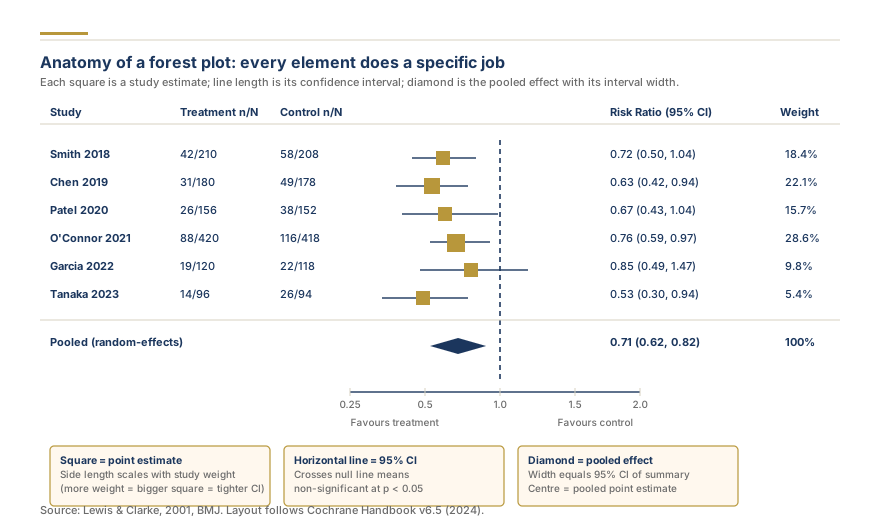
Every forest plot contains seven structural elements. Understanding each component is the prerequisite for accurate forest plot interpretation. The following breakdown covers each element from left to right as it appears on a standard plot.
Study Labels
The left column lists each included study, typically formatted as "Author (Year)." Studies may be ordered chronologically, alphabetically, or by subgroup. In Cochrane forest plots, studies within subgroups are listed together with subtotals before the overall pooled estimate.
Effect Size Squares
Each study's result is displayed as a square positioned on the horizontal axis. The center of the square represents the study's point estimate, the calculated effect size for that individual study. The position along the axis tells you the magnitude and direction of the effect.
Confidence Interval Lines
A horizontal line extends from each side of the square, representing the study's 95% confidence interval. The confidence interval width indicates the precision of the estimate. Narrow intervals mean more precise estimates (typically from larger studies), while wide intervals indicate greater uncertainty. If the horizontal line crosses the vertical line of no effect, that study's result alone is not statistically significant.
The Vertical Line of No Effect
A vertical reference line marks the point of no effect. For mean difference (MD) and standardized mean difference, this line sits at zero. For odds ratio forest plots, risk ratio forest plots, and hazard ratio forest plots, it sits at one. Any study or pooled result whose confidence interval crosses this line has not demonstrated a statistically significant effect.
The Diamond (Pooled Estimate)
The diamond at the bottom of the plot represents the diamond summary estimate, the overall pooled effect size calculated from all included studies. The center of the diamond is the combined point estimate, and the left and right tips show the 95% confidence interval. If the diamond does not cross the line of no effect, the overall result is statistically significant. The diamond is the single most important element on the plot because it represents the synthesis of all available evidence.
Weight Column
A column on the right side of many forest plots displays the study weight as a percentage. Study weight reflects how much each study contributes to the pooled estimate. In a fixed-effect model, weight is determined entirely by sample size and variance. In a random-effects model, weights are more evenly distributed because the model accounts for both within-study and between-study variance (DerSimonian & Laird, 1986). The size of each square on the plot is proportional to its weight, larger squares represent studies with greater influence on the pooled result.
Forest Plot Statistics
Below the diamond, most forest plots display key statistical summaries: the I-squared (I²) statistic for heterogeneity, tau-squared for between-study variance, the Q-test p-value, and the overall effect p-value. These numbers are critical for evaluating whether the pooled result is reliable and whether the included studies are measuring the same underlying effect.
Forest Plot Interpretation: A Step-by-Step Reading Guide
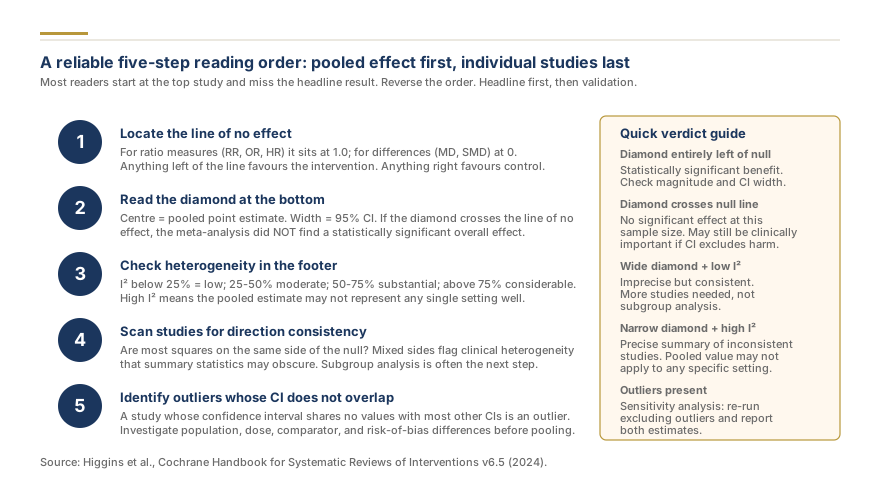
Read a forest plot in five steps: (1) check the diamond position relative to the line of no effect, (2) assess individual study consistency, (3) evaluate heterogeneity via I², (4) examine study weights, and (5) check the overall p-value. This framework ensures you extract every piece of information the plot provides without skipping critical details.
Step 1: Look at the diamond. Does the diamond cross the line of no effect? If no, the pooled result is statistically significant. Note the direction, is the effect favoring treatment or control, intervention or comparator? The position of the diamond summary estimate tells you both the direction and magnitude of the combined finding.
Step 2: Check individual study consistency. Are most study squares on the same side of the line of no effect? When studies cluster on one side, the evidence is more consistent. When studies scatter across both sides, the pooled estimate may be masking important differences between studies. Consistent results strengthen your confidence in the meta-analysis results.
Step 3: Assess heterogeneity. Look at the I-squared value below the plot. I-squared measures the percentage of variability across studies that is due to real differences rather than chance. I-squared interpretation follows Cochrane thresholds: below 25% is low, 25-50% is moderate, 50-75% is substantial, and above 75% is considerable heterogeneity. High heterogeneity means the studies are not measuring the same thing, and the pooled estimate should be interpreted with caution.
Step 4: Examine study weights. Are the squares roughly similar in size, or does one study dominate? A single large study contributing 40% or more of the total weight can drive the pooled estimate. If that dominant study has methodological limitations, the pooled result may not reflect the broader evidence base. The study weight distribution matters as much as the final number.
Step 5: Check the overall p-value. The p-value for the overall effect test tells you whether the pooled result is statistically distinguishable from zero (or one, for ratio measures). A p-value below 0.05 is conventionally considered statistically significant, but always interpret this alongside the confidence interval width and clinical relevance of the effect magnitude.
Need publication-ready forest plots for your meta-analysis? Our biostatisticians generate and interpret forest plots, subgroup analyses, and sensitivity analyses using validated statistical software. request a professional research quote, or explore our meta-analysis services.
Effect Size Measures on Forest Plots
The type of effect size displayed on a forest plot depends on the outcome being measured and the study designs included. Choosing the correct metric and scale is essential for accurate forest plot interpretation.
Mean Difference (MD) and Standardized Mean Difference
When all studies measure outcomes on the same scale (e.g., blood pressure in mmHg), the forest plot displays mean differences with the line of no effect at zero. When studies use different scales to measure the same construct (e.g., pain measured by VAS and NRS), the standardized mean difference is used, typically reported as Cohen's d or Hedges' g. Hedges' g applies a correction for small sample bias, making it the preferred choice for meta-analyses with studies under 20 participants per group. Before creating a forest plot, calculate your effect sizes with our free our free effect size calculator.
Odds Ratio (OR) and Risk Ratio (RR)
For dichotomous outcomes (event occurred or did not), forest plots display odds ratios or risk ratios. An odds ratio compares the odds of an event in the treatment group versus the control group. A risk ratio compares the probability of an event. Both use a line of no effect at 1, and values are plotted on a logarithmic scale to ensure symmetry, an OR of 0.5 (halved odds) and an OR of 2.0 (doubled odds) appear equidistant from 1.
Hazard Ratio (HR)
For time-to-event outcomes (survival analysis), forest plots display hazard ratios. Like OR and RR, the line of no effect is at 1 and values are plotted on a log scale. A hazard ratio below 1 typically indicates a protective effect (slower event occurrence in the treatment group).
| Measure | Outcome Type | Line of No Effect | Scale | Common Use |
|---|---|---|---|---|
| Mean Difference (MD) | Continuous (same scale) | 0 | Linear | Blood pressure, weight |
| Standardized Mean Difference | Continuous (different scales) | 0 | Linear | Pain, depression scores |
| Odds Ratio (OR) | Dichotomous | 1 | Log | Case-control studies |
| Risk Ratio (RR) | Dichotomous | 1 | Log | RCTs, cohort studies |
| Hazard Ratio (HR) | Time-to-event | 1 | Log | Survival analysis |
Understanding Heterogeneity on a Forest Plot
Heterogeneity on a forest plot reveals whether the included studies are measuring the same underlying effect or producing genuinely different results. Visual and statistical cues work together to quantify this variation and determine whether the pooled effect size is a meaningful summary or an oversimplification.
Visual cues provide the first indication. When confidence intervals overlap substantially and most squares cluster near the diamond, heterogeneity is low. When intervals are scattered across the plot with minimal overlap, or when some studies show strong positive effects while others show negative effects, heterogeneity is high. In our meta-analysis work, the most common misinterpretation we encounter is researchers focusing on the diamond while ignoring I² values above 75%.
I-squared interpretation follows established Cochrane thresholds for the heterogeneity assessment:
| I² Value | Classification | Interpretation |
|---|---|---|
| 0-25% | Low | Studies are consistent; pooled estimate is reliable |
| 25-50% | Moderate | Some variation; investigate but pooled estimate is usually acceptable |
| 50-75% | Substantial | Meaningful variation; explore with subgroup analysis |
| >75% | Considerable | Studies disagree; pooled estimate should be interpreted with caution |
Cochrane classifies heterogeneity as low (I² < 25%), moderate (25-50%), substantial (50-75%), or considerable (>75%), these thresholds guide whether the pooled estimate should be interpreted with caution (Higgins et al., 2023).
When heterogeneity is substantial or considerable, subgroup analysis and meta-regression can explore potential sources. Common sources include differences in study populations, interventions, outcome measurement, and follow-up duration. The Q-test provides a p-value for heterogeneity, but it has low statistical power with few studies and excessive power with many studies, I² is generally more informative. Tau-squared quantifies the absolute amount of between-study variance in a random-effects model. For a deeper discussion, see our guide on understanding heterogeneity in meta-analysis.
In a random-effects meta-analysis, study weights are more evenly distributed than in a fixed-effect model, because the random-effects model accounts for both within-study and between-study variance (DerSimonian & Laird, 1986). This distinction matters because the model choice affects both the width of the diamond and the relative influence of each study.