Learn how to conduct a meta-analysis in R using the metafor package. Step-by-step tutorial covering installation, data preparation, forest plots, heterogeneity, and publication bias assessment.
Dr. Sarah Mitchell
March 3, 2026
Key Takeaways
The metafor package is the most comprehensive and widely cited R package for meta-analysis, supporting over 40 effect size measures and both fixed-effect and random-effects models
Data preparation is the most time-consuming step: each study needs a standardized effect size (log odds ratio, standardized mean difference, or correlation) and its variance before analysis can begin
The escalc() function in metafor calculates effect sizes and sampling variances from summary statistics, eliminating manual computation errors
Forest plots created with forest() provide a visual summary of individual study effects, confidence intervals, and the pooled estimate with its prediction interval
Always report both the confidence interval (precision of the average effect) and the prediction interval (range of true effects across settings) when presenting random-effects results
Publication bias should be assessed using multiple complementary methods: funnel plots, Egger regression test, trim-and-fill analysis, and p-curve or selection models
Meta-analysis in R gives researchers access to the most powerful, flexible, and freely available tools for synthesizing quantitative evidence. The metafor package, created by Wolfgang Viechtbauer, is the gold standard for meta-analysis in R, cited in over 15,000 peer-reviewed publications and supporting more than 40 different effect size measures.
This guide walks through every step of conducting a meta-analysis in R using metafor, from installing packages and preparing data to generating forest plot creation tool, assessing learn about heterogeneity, testing for publication bias, and running sensitivity analyses. Whether you are running your first meta-analysis or transitioning from other software, this tutorial covers the practical workflow with real code examples.
Setting Up R for Meta-Analysis
Before running any analysis, install the required packages. Open R or RStudio and run:
Install metafor (the core package): install.packages("metafor"). This installs metafor along with its dependencies. Load it with library(metafor).
Install meta (optional, for convenience functions): install.packages("meta"). The meta package provides higher-level wrapper functions like metabin() for binary outcomes and metacont() for continuous outcomes that some researchers find more intuitive.
Install dmetar (optional, for advanced diagnostics): This package by Mathias Harrer provides additional functions for outlier detection, influence analysis, and power calculations. Install from GitHub using devtools::install_github("MathiasHarrer/dmetar").
For forest plot customization, the base metafor forest() function is sufficient for most publications. If you need advanced visualizations, the ggplot2 and forestplot packages offer additional options.
Preparing Your Data for Meta-Analysis
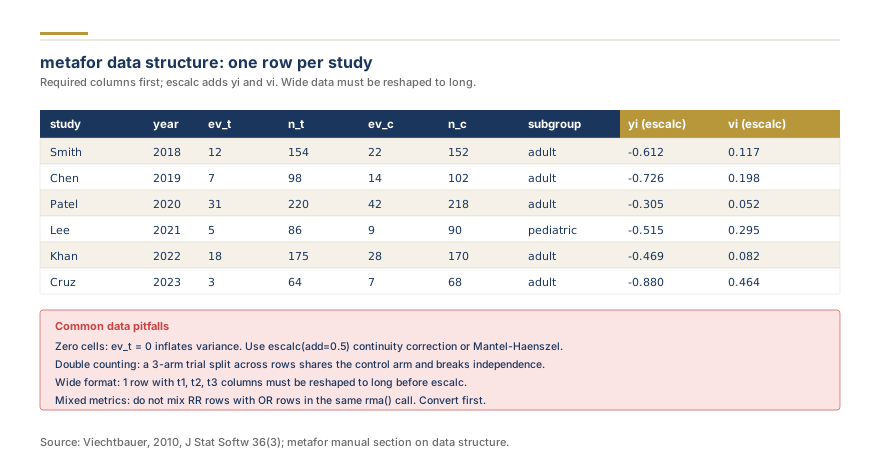
metafor data structure: one row per study
Data preparation is the most critical and time-consuming step. Each included study must contribute a standardized effect size and its sampling variance (or standard error) for the analysis.
Common effect size types:
Log odds ratio (OR): For binary outcomes (event vs. no event). Always use the log-transformed OR for analysis, then back-transform for interpretation
Standardized mean difference (SMD/Hedges' g): For continuous outcomes measured on different scales across studies. Hedges' g includes a small-sample correction that is preferred over Cohen's d
Mean difference (MD): For continuous outcomes measured on the same scale across all studies
Correlation coefficient (r): For association studies. Use Fisher's z transformation during analysis, then back-transform
The escalc() function in metafor calculates effect sizes and sampling variances from summary statistics. For a two-group comparison with binary outcomes:
dat <- escalc(measure="OR", ai=events_treat, bi=nonevents_treat, ci=events_control, di=nonevents_control, data=mydata)
For continuous outcomes using means and standard deviations:
dat <- escalc(measure="SMD", m1i=mean_treat, sd1i=sd_treat, n1i=n_treat, m2i=mean_control, sd2i=sd_control, n2i=n_control, data=mydata)
This eliminates manual calculation errors and automatically computes the sampling variance (vi) needed for the model.
Running the Meta-Analysis Model
The core function in metafor is rma(), which fits meta-analytic models:
Random-effects model (most common): res <- rma(yi, vi, data=dat, method="REML"). The REML (restricted maximum likelihood) estimator is the default and recommended method for estimating between-study variance (tau-squared). Alternatives include DerSimonian-Laird (method="DL"), which is simpler but can underestimate tau-squared with few studies.
Fixed-effect model:res <- rma(yi, vi, data=dat, method="FE"). Use this only when you believe all studies estimate the same underlying true effect, which is rarely justified in practice.
Interpreting the output: The summary() or print() of the rma object reports the pooled effect estimate, its standard error, z-value, p-value, and 95% confidence interval. It also reports tau-squared (between-study variance), I-squared (percentage of total variability due to heterogeneity), and the Q-test for heterogeneity.
The forest plot is the signature visualization of a meta-analysis. In metafor, generate one with:
forest(res, slab=dat$study_label, header=TRUE)
Key elements of a forest plot: each study appears as a square (sized by weight) with a horizontal line (95% confidence interval). The diamond at the bottom represents the pooled effect estimate with its confidence interval.
Customization options for publication-ready plots:
xlim and alim: Control axis range and study label alignment
ilab and ilab.xpos: Add additional columns (sample sizes, event counts)
refline=0: Add a vertical line at no effect (log OR=0 or SMD=0)
order="obs": Sort studies by effect size instead of alphabetically
addpred=TRUE: Add a prediction interval showing the range of true effects expected in future studies
Always include both the confidence interval (precision of the average effect) and the prediction interval (expected range of effects across settings) in comparing random and fixed effect approaches.
Assessing and Exploring Heterogeneity
Heterogeneity measures how much the true effect varies across studies. Key statistics:
Q-test:print(res) reports the Q statistic and p-value. A significant Q (p < 0.10) indicates heterogeneity beyond sampling error
I-squared: Percentage of variability due to true differences. Rough benchmarks: 25% low, 50% moderate, 75% high
Tau-squared: Absolute measure of between-study variance in the true effect size
Prediction interval: The most interpretable measure. A wide prediction interval means effects vary substantially across settings
Moderator analysis (meta-regression) explores sources of heterogeneity:
With few studies (fewer than 10 per covariate), meta-regression has low power and results should be interpreted cautiously.
Testing for Publication Bias
our guide to publication bias occurs when studies with statistically significant results are more likely to be published, potentially inflating the pooled estimate. Assess it using multiple complementary methods:
Funnel plot:funnel(res) plots each study's effect size against its precision (standard error). Asymmetry suggests potential bias, with missing studies in the lower-left region indicating suppressed non-significant findings.
Egger's regression test:regtest(res) tests for funnel plot asymmetry statistically. A significant result (p < 0.10) suggests small-study effects, though this test has low power with fewer than 10 studies.
Trim-and-fill method:trimfill(res) estimates the number of "missing" studies and provides an adjusted pooled estimate. This is a sensitivity analysis, not a definitive correction.
P-curve analysis and selection models (selmodel() in metafor) are more modern approaches that model the selection process directly and are increasingly recommended in methodological literature.
Report all publication bias assessments transparently, including their limitations with small numbers of studies.
Sensitivity Analysis and Diagnostics
Leave-one-out analysis removes each study in turn and re-fits the model: leave1out(res). This identifies influential studies that disproportionately drive the pooled result. If removing a single study changes the conclusion, flag this in your report.
Influence diagnostics:influence(res) computes Cook's distance, DFFITS, hat values, and other measures for each study. Visualize with plot(influence(res)).
Baujat plot:baujat(res) shows each study's contribution to overall heterogeneity versus its influence on the pooled result. Studies in the upper-right quadrant are both heterogeneous and influential.
Cumulative meta-analysis:cumul(res, order=dat$year) adds studies one at a time in chronological order, revealing whether the evidence has stabilized or shifted over time.
Run sensitivity analyses for key methodological decisions: restricting to low bias assessment methodology studies, using different effect size measures, and comparing random-effects estimators (REML vs. DL vs. Paule-Mandel).
Common Pitfalls and Best Practices
Do not use the fixed-effect model by default. Unless you have a strong theoretical reason to assume all studies estimate identical effects, the random-effects model is almost always appropriate. The choice between models affects both the pooled estimate and its confidence interval.
Always report the prediction interval alongside the confidence interval. A meta-analysis can show a significant average effect (narrow CI excluding zero) while the prediction interval includes zero, meaning the effect may not replicate in all settings.
Do not run meta-regression with too few studies. The commonly cited rule of thumb is at least 10 studies per covariate, though even this may be insufficient. With 5 studies total and 3 covariates, the analysis will run but results are meaningless.
Do not conflate statistical significance with clinical importance. A pooled odds ratio of 1.05 (95% CI: 1.01-1.09) may be statistically significant with enough studies but clinically irrelevant. Always interpret effect sizes in context.
Use REML for tau-squared estimation. The DerSimonian-Laird estimator, still the default in some older software, underestimates tau-squared especially with few studies. REML is the recommended default in metafor and most methodological guidance.
Save your analysis script. One of R's greatest advantages over point-and-click software is reproducibility. Your entire analysis, from data import through final forest plot, should be captured in a single script that any reviewer can re-run.
Recommended Workflow Summary
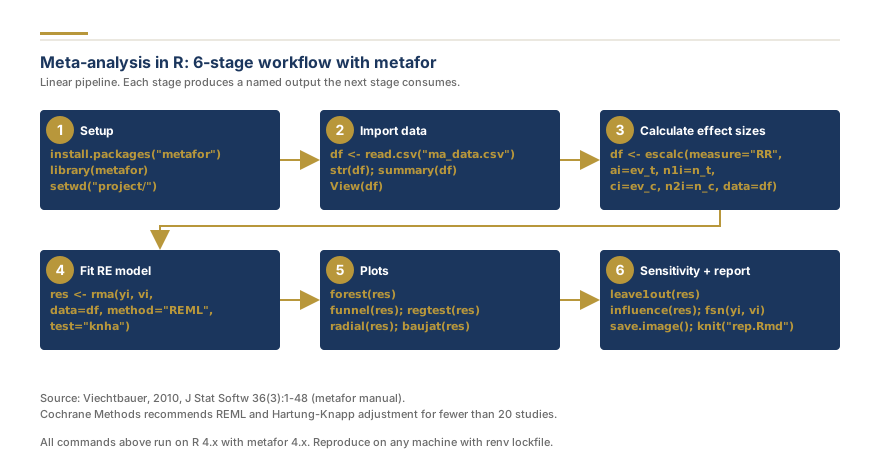
Meta-analysis in R: 6-stage workflow with metafor
A complete meta-analysis workflow in R follows this sequence: (1) prepare your data file with study identifiers and raw summary statistics, (2) calculate standardized effect sizes with escalc(), (3) fit the random-effects model with rma(), (4) generate the forest plot with forest(), (5) assess heterogeneity with Q, I-squared, and prediction intervals, (6) explore heterogeneity sources with moderator analysis if pre-specified, (7) test for publication bias with funnel plots, Egger's test, and trim-and-fill, (8) run leave-one-out and influence diagnostics, and (9) compile all results for your manuscript.
For your developing a systematic review protocol, specify the planned statistical methods including the effect size measure, model type, heterogeneity estimator, and pre-specified subgroup analyses. This prevents data-driven analytical decisions that inflate false-positive rates.
The metafor package by Wolfgang Viechtbauer is the most comprehensive and widely cited R package for meta-analysis. It supports over 40 effect size measures, multiple model types (fixed-effect, random-effects, multivariate, network), and extensive diagnostic tools. The meta package by Guido Schwarzer is a good alternative that provides a simpler interface with wrapper functions for common analyses. For Bayesian meta-analysis, the brms and bayesmeta packages are available.
While R can technically run a meta-analysis with as few as 2 studies, most methodologists recommend a minimum of 5 studies to obtain meaningful results. With fewer than 5 studies, the estimate of between-study heterogeneity (tau-squared) is very imprecise, confidence intervals are unreliable, and publication bias tests lack statistical power. The software will run the analysis regardless, but interpretation requires caution with small numbers of studies.
Both R and Stata are excellent for meta-analysis. R (metafor) offers more flexibility, more effect size measures, is free, and has stronger support for advanced methods like network meta-analysis and multivariate models. Stata (metan, admetan) provides a more streamlined interface and is popular in epidemiology and health economics. The choice often depends on your existing software skills and institutional access. R has the advantage of being open source with an active development community.
Yes, R is completely free and open source. All meta-analysis packages including metafor, meta, dmetar, and bayesmeta are freely available from CRAN. You can also use RStudio (the free desktop version) as your development environment. This makes R the most accessible option for researchers without institutional software licenses.
The metafor package provides a lower-level, more flexible interface with the rma() function family, supporting 40+ effect size types and advanced modeling options. The meta package provides higher-level wrapper functions (metabin, metacont, metaprop) that are easier for beginners but less customizable. Many researchers use both: meta for quick standard analyses and metafor when they need advanced features like moderator analyses, multivariate models, or custom effect size measures.
Share
Found this useful? Share it with your colleagues.
Need help with your meta-analysis?
Our PhD statisticians run complete meta-analyses: effect sizes, forest plots, heterogeneity testing, and publication-ready results sections.
Reading About Meta-Analysis? Our PhD Team Runs Them Every Day.
From data extraction to forest plots, sensitivity analysis, and a journal-ready manuscript. We handle the full meta-analysis so you can focus on your research question.
Our promise: Free re-run of the pooled analysis if reviewers question the estimate or model.
4.9 / 5Quote within a few hoursmetafor R + Cochrane HandbookPhD methodologistConfidential by default
Dr. Sarah Mitchell holds a PhD in Biostatistics from Johns Hopkins Bloomberg School of Public Health and has over 15 years of experience in systematic review methodology and meta-analysis. She has authored or co-authored 40+ peer-reviewed publications in journals including the Journal of Clinical Epidemiology, BMC Medical Research Methodology, and Research Synthesis Methods. A former Cochrane Review Group statistician and current editorial board member of Systematic Reviews, Dr. Mitchell has supervised 200+ evidence synthesis projects across clinical medicine, public health, and social sciences.
Reading About Meta-Analysis? Our PhD Team Runs Them Every Day.
From data extraction to forest plots, sensitivity analysis, and a journal-ready manuscript. We handle the full meta-analysis so you can focus on your research question.
Krippendorff's alpha explained: what it measures, how it differs from Cohen's kappa, acceptable thresholds, and which agreement coefficient fits your coding design.
CHEERS 2022 checklist explained: all 28 items, what changed from CHEERS 2013, and how to report a cost-effectiveness analysis so payers and journals can use it.
SPIRIT 2025 checklist explained: all 34 items by section, what changed from SPIRIT 2013, and how the protocol lines up with CONSORT 2025 when you report the trial.