metafor R Package: Functions, Errors, Alternatives
metafor is the reference R package for meta-analysis. Install, function index, data structures, common errors, reproducibility, and alternative packages.
Dr. Sarah Mitchell
May 13, 2026
Key Takeaways
metafor is the reference R package for meta-analysis, created and maintained by Wolfgang Viechtbauer at Maastricht University. The foundational paper appeared in the Journal of Statistical Software in 2010 and the package has been on CRAN since 2009.
Install with install.packages("metafor") for the CRAN release or remotes::install_github("wviechtb/metafor") for the development build. Cite via citation("metafor") in every peer-reviewed manuscript that uses the package.
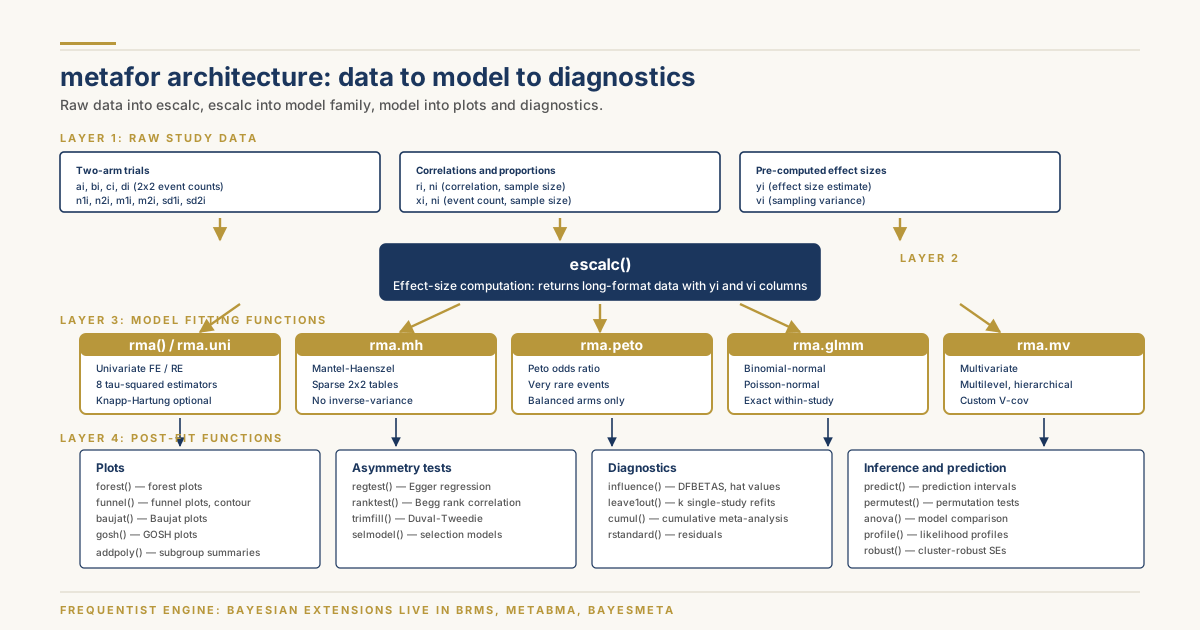
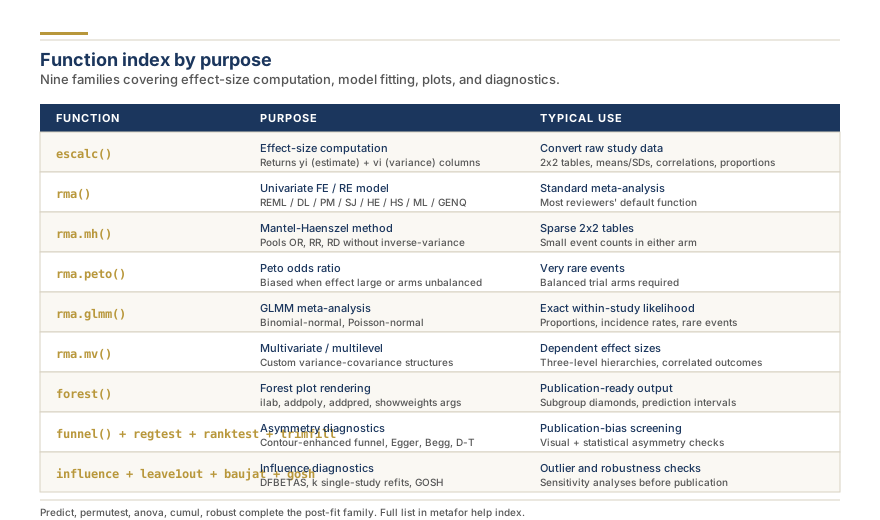
Function families: escalc for effect-size computation, rma family for model fitting (univariate, Mantel-Haenszel, Peto, GLMM, multivariate), forest and funnel for plots, regtest and ranktest and trimfill for asymmetry diagnostics, influence and leave1out and baujat and gosh for outlier checks.
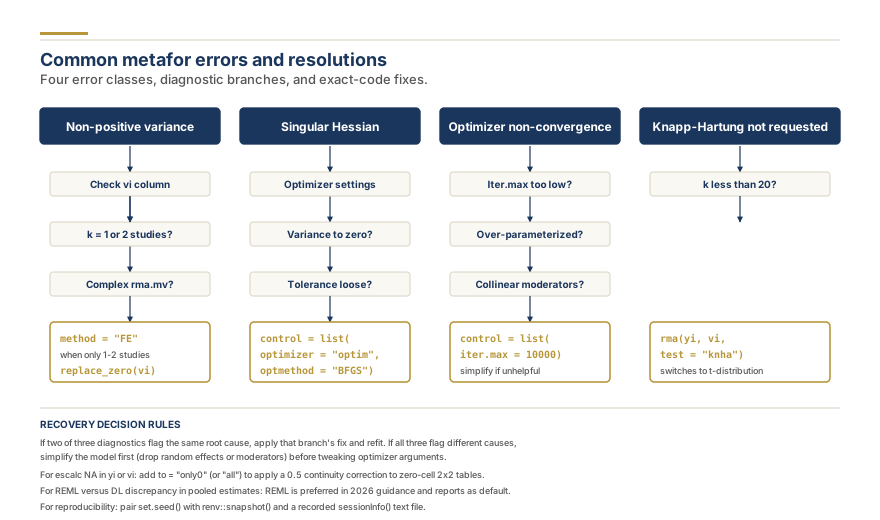
Common errors and fixes: non-positive variance (check vi, drop variance components), singular Hessian (switch optimizer), non-convergence (raise iter.max), Knapp-Hartung for k less than 20 (add test = "knha" argument).
metafor is frequentist. Bayesian extensions live in brms, bayesmeta, and metaBMA. Network meta-analysis lives in netmeta. Structural equation meta-analysis lives in metaSEM. Robust variance estimation pairs with clubSandwich. Reproducibility requires renv plus set.seed plus sessionInfo.
metafor is an R package by Wolfgang Viechtbauer that provides a comprehensive collection of functions for fitting fixed-effect, random-effects, and mixed-effects meta-analytic models, including standard univariate, multivariate, multilevel, and meta-regression analyses. The package is distributed free of charge through the Comprehensive R Archive Network, is documented in the foundational Journal of Statistical Software article from 2010, and has become the de facto reference implementation for meta-analytic methods in the open-source statistical community. This guide is a package reference: install instructions, the function index by purpose, the data structures the package expects, troubleshooting for the errors that most commonly stop a fit from converging, and the connections to surrounding R packages that handle the cases metafor was not designed for.
metafor package architecture: effect size computation, model fitting, plotting and diagnostics
The treatment that follows assumes a working R installation and familiarity with data frames, formulas, and the basic statistical concepts of effect size, weighted mean, and confidence interval. Readers who need the surrounding methodology rather than the package mechanics should follow the complete meta-analysis workflow in R and the step-by-step meta-analysis guides, which cover study selection, data extraction, and interpretation of pooled estimates in a way that this reference deliberately does not.
Installing metafor, Its Dependencies, and Verifying the Environment
The released version of metafor installs from CRAN with a single call: install.packages("metafor"). The current release is version 4.6 series as of 2026, and CRAN keeps the source plus pre-compiled binaries for Windows and macOS for the two most recent major R versions. The development version, which receives bug fixes and new features before they are released to CRAN, lives on the maintainer's repository and installs with remotes::install_github("wviechtb/metafor") after the remotes package itself is installed. The development version is generally safe for production work and is what package contributors test against; users who need a feature added in the last six months should install from GitHub rather than wait for the next CRAN cycle.
Two upstream dependencies deserve attention. Matrix is the workhorse linear algebra package on which metafor's matrix-based estimators depend, and it is a CRAN recommended package that ships with R, so installation rarely fails. mathjaxr is used by the package documentation system to render mathematical notation in help pages and is also pulled automatically by CRAN. The optimizer-related packages nlme, numDeriv, CompQuadForm, and minqa are suggested rather than required, meaning the core fitting functions work without them but specific advanced features (Knapp-Hartung adjustments, certain generalized linear mixed-model fits, score tests) will not work until they are installed. After installation, library(metafor) followed by sessionInfo() confirms the loaded version, the underlying R version, and the BLAS and LAPACK libraries the linear algebra is running against. For reproducibility the BLAS library matters: an OpenBLAS or Intel MKL installation gives different floating-point results in the final decimal places than the reference BLAS shipped with base R, and serious projects should record which one was used.
History, Author, and the Citation You Owe
The metafor package was first released to CRAN on June 5, 2009 by Wolfgang Viechtbauer, then a researcher at Maastricht University in the Netherlands. The foundational paper, "Conducting Meta-Analyses in R with the metafor Package," appeared in the Journal of Statistical Software in 2010, volume 36, issue 3, pages 1 to 48. The paper documents the package architecture, lists the model classes, and walks through worked examples with the Bacillus Calmette-Guerin vaccine data and the cardiovascular morbidity data that are now standard teaching examples. The citation that any peer-reviewed manuscript using metafor must include is reachable inside R itself by typing citation("metafor"), which prints the BibTeX entry alongside the human-readable form.
Viechtbauer has continued as sole maintainer through the entire history of the package, which by 2026 has accumulated more than 250 reverse imports and suggests on CRAN, meaning that many downstream meta-analysis packages depend on it. The size, longevity, and citation footprint of metafor make it the closest thing the meta-analysis community has to a reference implementation, and methodological papers that introduce new estimators routinely include metafor code alongside the mathematical derivation.
Function Index by Purpose
The metafor namespace contains over 90 exported functions. Most analyses use a small subset of those, and the rest exist for specialized cases or as utility helpers. The functional groupings below cover what reviewers actually need.
Effect size computation: escalc. The function escalc() is the entry point for converting raw study data (event counts, means and standard deviations, correlations, proportions, hazard ratios) into the effect-size metrics used by meta-analytic models, paired with the sampling variance of that estimate. The measure argument controls which metric is calculated: "RR" for the log risk ratio, "OR" for the log odds ratio, "PETO" for the Peto odds ratio, "SMD" for the standardized mean difference (Hedges' g by default), "ROM" for the log ratio of means, "ZCOR" for Fisher's z-transformed correlation, "PLO" for the logit-transformed proportion, "PR" for the raw proportion, "IR" for the incidence rate, and so on, with more than 50 metrics supported overall. escalc() returns a data frame with two new columns, yi and vi, holding the effect size estimate and its sampling variance, which are the standard inputs to the model-fitting functions.
Univariate models: rma.uni and the rma shortcut. The function rma() is an alias for rma.uni() and is the function most reviewers call. It fits fixed-effect, random-effects, and mixed-effects meta-analyses (the last when moderators are added) using either weighted least squares with known weights for fixed-effect, or one of several between-study variance estimators for random-effects: method = "DL" (DerSimonian-Laird), "REML" (restricted maximum likelihood, the default and recommended in modern guidance), "ML" (maximum likelihood), "HE" (Hedges), "HS" (Hunter-Schmidt), "SJ" (Sidik-Jonkman), "PM" (Paule-Mandel), "GENQ" (generalized Q-statistic), and "FE" (fixed-effect). The Knapp-Hartung adjustment to standard errors is requested via test = "knha". The methodological reasoning behind the choice of estimator is treated in the REML versus DerSimonian-Laird guide.
Sparse data and 2x2 tables: rma.mh and rma.peto. The rma.mh() function implements the Mantel-Haenszel method for pooling odds ratios, risk ratios, and risk differences from 2x2 tables without the inverse-variance assumption that rma.uni makes. It is appropriate when the number of events in either arm is small, where the inverse-variance weighting can become unstable. The rma.peto() function fits the Peto odds ratio, which is recommended for very rare events and balanced trial arms but is known to be biased when treatment effects are large or arms are unbalanced.
Generalized linear mixed models: rma.glmm. The rma.glmm() function fits binomial-normal and Poisson-normal meta-analytic models, treating the within-study likelihood exactly rather than approximating it with normality on a transformed scale. This is the recommended approach for meta-analysis of proportions, incidence rates, and rare-event 2x2 tables when sample sizes are small. The function uses lme4 internally for the random-effects fit and can take noticeably longer to run than rma.uni.
Multivariate and multilevel models: rma.mv. The rma.mv() function fits multivariate, multilevel, and hierarchical meta-analytic models, including models with correlated outcomes within studies, multiple effect sizes per study, and three- or higher-level hierarchies (effects nested within studies nested within research groups). The variance-covariance structure of the random effects is fully customizable through the random argument, allowing compound symmetric, autoregressive, heteroscedastic compound symmetric, and arbitrary user-specified structures. This is the function used for dependence modeling when robust variance estimation alone is insufficient.
metafor function index: families by purpose
Forest plots: forest. The function forest() is a method dispatcher with class-specific implementations for rma objects, escalc objects, and raw input vectors. The rma method draws the classic Cochrane-style forest plot with study weights, individual confidence intervals, a pooled diamond at the bottom, and optional heterogeneity statistics in the bottom-left corner. Heavy customization is supported through the xlim, alim, ilab, header, mlab, addfit, and addpred arguments; subtotals and grouping are accomplished by repeated calls to addpoly() after the main plot.
Funnel plots: funnel. The function funnel() draws funnel plots from rma objects with three style options: the classic funnel with theoretical confidence-interval pseudo-bounds, the contour-enhanced funnel that overlays significance regions (the contour-enhanced variant is the one Peters and Sterne recommend for visual diagnosis of asymmetry caused by publication bias rather than heterogeneity), and the funnel of standardized residuals. The y-axis variable is configurable: standard error, sampling variance, inverse standard error, or sample size.
Asymmetry tests: regtest and ranktest. The regtest() function performs Egger's regression test for funnel-plot asymmetry, with options for the predictor (predictor = "sei", the standard error, is the original Egger specification; "vi", the sampling variance; "ninv", the inverse sample size, and others). The function ranktest() performs Begg and Mazumdar's rank correlation test, which is less powerful than the regression test but does not assume linearity of the asymmetry relationship.
Trim and fill: trimfill. The trimfill() function implements Duval and Tweedie's trim-and-fill procedure for imputing studies that are "missing" from one side of the funnel and recomputing a publication-bias-corrected pooled estimate. The method is now generally considered useful only as a sensitivity analysis rather than a definitive correction; selection-model approaches and PET-PEESE are increasingly preferred in 2026 practice.
Influence diagnostics: influence, leave1out, baujat, gosh. The influence() function returns DFBETAS, DFFITS, Cook's distances, hat values, and standardized residuals on a per-study basis. The leave1out() function refits the model excluding each study in turn, returning a data frame of pooled estimates and heterogeneity statistics with one row per study; useful for identifying influential outliers. The baujat() function draws Baujat plots, which scatter each study's contribution to the overall Q statistic against its influence on the pooled estimate, making outliers visually obvious. The gosh() function performs a graphical display of study heterogeneity, fitting models to many random subsets of the studies and plotting the resulting pooled-estimate distribution against the heterogeneity distribution, revealing whether outliers shift the entire pooled estimate or merely the heterogeneity.
Prediction intervals: predict. The predict() method on an rma object returns the pooled point estimate, its confidence interval, and the prediction interval for the true effect in a future setting drawn from the same distribution as the included studies. The prediction interval is wider than the confidence interval and is the more honest quantity for clinical decision-making in heterogeneous meta-analyses.
Permutation tests: permutest. The permutest() function runs permutation-based inference for model coefficients in fixed-effects and mixed-effects meta-analyses, which is useful when small numbers of studies cast doubt on the validity of large-sample chi-squared approximations.
Need help with your meta-analysis?
Our PhD statisticians run complete meta-analyses: effect sizes, forest plots, heterogeneity testing, and publication-ready results sections.
The package expects effect sizes and their sampling variances in long format: one row per study (or one row per effect size if multiple effects per study are being modelled with rma.mv), with named columns for at least an effect size estimate, its sampling variance, and a study identifier. The convention adopted throughout the package is that the effect-size column is called yi and the sampling-variance column is called vi. The function escalc() returns data already in this format. Moderators are added as additional columns and referenced through formulas in the mods argument (mods = ~ age + dose + study_year for three continuous moderators, or mods = ~ factor(setting) for a categorical moderator with several levels).
For two-arm trials the escalc() function takes the columns ai, bi, ci, di for the cell counts of a 2x2 table (events and non-events in treatment and control), or n1i, n2i, m1i, m2i, sd1i, sd2i for continuous outcomes (sample sizes, means, standard deviations in each arm). For correlations the inputs are ri (correlation coefficient) and ni (sample size). For proportions the inputs are xi (event count) and ni (sample size). For incidence rates the inputs are xi (events) and ti (person-time at risk). The full argument list is documented in ?escalc and runs to several pages.
Connecting metafor to Standard Input Formats
Most extraction work happens outside R, in spreadsheets or specialized tools, and the resulting file imports into R through standard pathways. CSV files import with read.csv() or the readr package's read_csv(), which preserves column types more reliably. Excel files import via the readxl package, which avoids the need for any Java dependency. RevMan files in the proprietary .rm5 XML format can be parsed by the revtools and RevManageR packages, although in practice many users export the RevMan data as CSV through the RevMan interface and import that. JAMOVI and JASP projects, which run on top of R, expose their data tables directly to R when running through their R-interface modules. Covidence and DistillerSR export extraction templates as CSV; the structure typically needs a small reshape from wide to long format with the tidyr package's pivot_longer() function before passing to escalc(). Reviewers moving from point-and-click tools to scripted analysis should follow the moving from GUI to reproducible R code walkthrough, which documents the import patterns across the common platforms.
Custom Forest Plots
The default forest() output is sensible but rarely publication-ready without customization. The most common modifications are: adding columns to the right of the study labels with the raw event counts and sample sizes (the ilab argument with a matrix and the ilab.xpos argument with x-coordinates for column placement); adding header text above the columns (the header argument or a manual call to text() after the plot is drawn); changing the x-axis range and axis tick locations (xlim for the overall plot range, alim for the data range, and at for the tick positions); rendering subgroup summary diamonds beneath each subgroup (addpoly() calls after the main plot, one per subgroup); displaying the prediction interval as a line under the pooled diamond (addpred = TRUE on the main forest() call); and adding study weights as a column on the right (showweights = TRUE). For complex multi-subgroup plots with consistent visual hierarchy, the common pattern is to set rows = ... explicitly so that subgroup rows are separated by blank rows, then call addpoly() for each subgroup summary at the calculated row positions. If you need a publication-ready figure without writing R, the free no-code forest plot generator produces the same Cochrane-style output directly from your effect sizes and confidence intervals.
Customizing Funnel Plots
The contour-enhanced funnel plot has become the standard diagnostic for funnel asymmetry, and the metafor implementation supports it directly: funnel(model, level = c(90, 95, 99), shade = c("white", "gray55", "gray75"), refline = 0) draws shaded regions corresponding to the conventional significance thresholds and lets the reader judge whether asymmetry occurs preferentially in non-significant regions (consistent with publication bias) or significant regions (suggesting other explanations). The trim-and-fill imputed studies appear on a funnel plot by calling funnel() on a trimfill object: tf <- trimfill(model); funnel(tf). Adding an Egger regression line overlay requires extracting the line parameters from regtest() and drawing them manually with abline() because metafor does not draw the line by default.
Bayesian Extensions When metafor Is Not Enough
metafor is a frequentist package: maximum likelihood, restricted maximum likelihood, method-of-moments, and weighted least squares are the estimators it provides. Bayesian meta-analysis with proper priors on the between-study standard deviation, on the pooled effect, and on the model coefficients runs in either the brms package, which wraps Stan and supports the full random-effects and multilevel meta-analytic specification through a familiar formula interface, or the metaBMA package, which handles model averaging across competing meta-analytic models and is recommended when the appropriate prior on heterogeneity is genuinely uncertain. The bayesmeta package is a third option, focused specifically on the simpler random-effects model with conjugate priors and offering exact posterior densities rather than Markov chain Monte Carlo. The choice between brms and bayesmeta is largely whether the analyst wants flexibility (brms) or analytic posteriors (bayesmeta).
Decision tree for common metafor errors and their resolutions
Common Errors and How to Resolve Them
The errors below are the ones that most often stop a metafor fit from converging and how to resolve each.
Non-positive variance. The error cannot calculate the inverse of the variance-covariance matrix of the estimates or non-positive-definite variance-covariance matrix typically means the fit has hit a degenerate solution. Common causes: only one or two studies in the data set (fit a fixed-effect model instead, method = "FE"), zero sampling variances entered for every study (check the vi column for missing or zero values), or, for rma.mv, a misspecified random-effects structure with more variance components than the data can identify. Resolution: simplify the random effects, fit a smaller model, or check the data for sampling-variance errors.
Singular Hessian. The error Hessian matrix is not positive definite typically appears in rma.mv fits with a complex random-effects structure. The fit may have converged to a likelihood maximum but the maximum is on the boundary of the parameter space (one of the variance components is essentially zero). Workaround: refit with control = list(rel.tol = 1e-7, optimizer = "optim", optmethod = "BFGS"), which switches to a more robust optimizer at the cost of speed; or drop the variance component that is collapsing to zero.
Optimizer non-convergence. The warnings optimizer did not achieve convergence in the maximum number of iterations or similar can usually be addressed by raising the iteration limit: control = list(iter.max = 10000). If raising the iteration limit does not help, the underlying issue is usually a poorly identified model.
REML versus DL discrepancy. When pooled estimates differ noticeably between method = "REML" and method = "DL", the cause is usually a high tau-squared estimate where the two estimators disagree on the heterogeneity. REML is preferred in 2026 guidance; the DL estimate is reported only for comparability with older work.
Empty escalc output. If escalc() returns NA values in yi and vi for some rows, the typical cause is missing or zero cell counts in the input data. The to = "all" argument adds a continuity correction (default 0.5) to all four cells of a 2x2 table when any cell is zero, allowing the log odds ratio to be computed. The to = "only0" variant applies the correction only to studies with at least one zero cell, which is closer to standard practice.
Knapp-Hartung not requested. Confidence intervals on the pooled estimate use a standard normal distribution by default, which is anti-conservative when the number of studies is small. The test = "knha" argument switches to a t-distribution with degrees of freedom equal to the number of studies minus the number of coefficients, which is the Knapp-Hartung adjustment and is recommended for k less than about 20.
Reproducibility and Package Version Control
A meta-analysis published in 2026 and reproduced by a reader in 2030 may produce slightly different numerical results because the underlying R version, the BLAS library, and the metafor package version have all changed in the intervening years. The minimum reproducibility documentation is the output of sessionInfo() at the end of the analysis script, recorded as a comment or a separate text file. The full reproducibility solution is the renv package, which locks the exact version of every R package used in the project to a renv.lock file that can be committed alongside the analysis scripts. A reviewer who runs renv::restore() in 2030 will recreate the exact package versions that produced the original results. The convention is to also set the random seed at the top of every script that uses any stochastic component (set.seed(42) is the canonical placeholder, but any integer works). The combination of seed-setting, renv lock file, and recorded session info is the gold standard for reproducible meta-analytic computation.
Alternatives and Complementary Packages
Several R packages cover meta-analytic territory that metafor either does not implement or implements only partially. The meta package by Guido Schwarzer and colleagues offers a parallel implementation with a different argument convention; its metabin(), metagen(), metainc(), and metaprop() functions are stable, widely used in Cochrane workflows, and the package is the engine behind several point-and-click tools. The metaSEM package extends meta-analysis to structural equation modelling, allowing pooled covariance matrices to be the input to factor analyses or path models. The netmeta package implements graph-theoretical network meta-analysis, supporting both contrast-based and arm-based parameterizations with consistency models. The robumeta package implements robust variance estimation for handling dependent effect sizes, often as a complement to metafor's rma.mv fits. The bayesmeta package, mentioned above, runs the conjugate-prior Bayesian random-effects model. The clubSandwich package extends robust variance estimation to cluster-robust standard errors on rma objects, which is the standard recommended approach when effect sizes are nested within studies.
The choice between metafor and meta is largely stylistic. metafor has the deeper function library, the multivariate and multilevel capabilities, and the larger number of diagnostic and customization options; meta has the simpler argument convention, the slightly easier learning curve, and the more direct mapping onto the Cochrane Handbook examples. Many systematic reviewers use both, picking whichever package's argument convention fits the immediate task. For the broader landscape of how to run a meta-analysis step by step across R and other platforms see the related guides.
What metafor Does Not Do
metafor is a meta-analysis engine, not a workflow management platform. It does not screen titles, deduplicate references, manage extraction templates, draw PRISMA flow diagrams, or generate Summary of Findings tables. Reviewers running the whole pipeline pair metafor with a screening tool such as the free Research Gold screening tool, Rayyan, or Covidence, with custom extraction templates such as the free extraction template builder for data capture, with robvis or the risk of bias chart generator for risk of bias visualization, and with GRADEpro for certainty-of-evidence judgments. Free, no-install options for the surrounding steps also include the reference deduplication tool and the PRISMA flow diagram generator. metafor's job is the statistical pooling and the post-fit diagnostics; the rest of the pipeline lives in other tools.
Frequently Asked Questions
What does metafor do in R?
metafor is the standard R package for fitting meta-analytic models. It computes effect sizes from raw study data, fits fixed-effect and random-effects models with multiple choices of between-study variance estimator, fits multilevel and multivariate models for dependence in effect sizes, and produces forest plots, funnel plots, regression and rank-correlation asymmetry tests, trim-and-fill imputations, leave-one-out and influence diagnostics, GOSH and Baujat plots, prediction intervals, and permutation tests. It is a frequentist engine; Bayesian extensions live in brms, bayesmeta, and metaBMA.
Who created the metafor package?
Wolfgang Viechtbauer, a researcher at Maastricht University in the Netherlands, created and continues to maintain metafor. The package was first released to CRAN in 2009 and the foundational paper appeared in the Journal of Statistical Software in 2010. Viechtbauer has remained sole maintainer through the entire history of the package.
Is metafor free?
Yes. metafor is open-source software distributed under the GPL-2 or GPL-3 license through the Comprehensive R Archive Network, free for any use including commercial. R itself is also free and open source. The only resource cost is the analyst's time and a computer capable of running R.
How do I install metafor?
In an R session run install.packages("metafor") to install the CRAN-released version. To install the development version run install.packages("remotes"); remotes::install_github("wviechtb/metafor"). After installation load the package with library(metafor) and confirm the version with packageVersion("metafor") or examine the full environment with sessionInfo().
What is the difference between metafor and the meta package?
Both packages fit the same kinds of frequentist meta-analytic models and produce similar plots. metafor has the deeper function library (multivariate, multilevel, generalized linear mixed-model fits, permutation tests, GOSH plots), uses a formula interface and the rma family of functions, and offers more customization options for forest and funnel plots. The meta package has a simpler argument convention, separate functions per outcome metric (metabin, metagen, metaprop), and is the engine behind several point-and-click tools in Cochrane workflows. The choice is largely stylistic; many reviewers use both.
Can metafor do network meta-analysis?
metafor itself does not implement contrast-based or arm-based network meta-analysis directly, although the rma.mv function can be used to fit network meta-analytic models when the contrast matrix is specified manually. The standard package for network meta-analysis in R is netmeta by Rucker and Schwarzer, which provides direct functions for league tables, ranking probabilities, and inconsistency checks. The multinma and gemtc packages offer Bayesian alternatives.
Pro Tip
Always set the random seed at the top of every analysis script with set.seed(42) or any integer. Combine with renv::snapshot() to lock package versions to a renv.lock file checked into version control.
Pro Tip
Use REML as the default tau-squared estimator (method = "REML") in 2026 practice. DerSimonian-Laird is reported only for backward comparability with older meta-analyses.
Pro Tip
Apply the Knapp-Hartung adjustment (test = "knha") when the number of studies is less than about 20. The default normal-distribution confidence intervals are anti-conservative for small k.
Pro Tip
Use the contour-enhanced funnel plot (funnel(model, level = c(90, 95, 99), shade = ...)) rather than the classic funnel. Shaded significance regions help distinguish publication bias from heterogeneity-driven asymmetry.
Pro Tip
Run citation("metafor") inside R to retrieve the canonical citation in BibTeX. Every peer-reviewed manuscript using the package owes the Viechtbauer 2010 Journal of Statistical Software citation.
Frequently Asked Questions
6
metafor is the standard R package for fitting meta-analytic models. It computes effect sizes from raw study data, fits fixed-effect and random-effects models with multiple choices of between-study variance estimator, fits multilevel and multivariate models for dependence in effect sizes, and produces forest plots, funnel plots, regression and rank-correlation asymmetry tests, trim-and-fill imputations, leave-one-out and influence diagnostics, GOSH and Baujat plots, prediction intervals, and permutation tests. It is a frequentist engine; Bayesian extensions live in brms, bayesmeta, and metaBMA.
Wolfgang Viechtbauer, a researcher at Maastricht University in the Netherlands, created and continues to maintain metafor. The package was first released to CRAN in 2009 and the foundational paper appeared in the Journal of Statistical Software in 2010. Viechtbauer has remained sole maintainer through the entire history of the package.
Yes. metafor is open-source software distributed under the GPL-2 or GPL-3 license through the Comprehensive R Archive Network, free for any use including commercial. R itself is also free and open source. The only resource cost is the analyst's time and a computer capable of running R.
In an R session run install.packages("metafor") to install the CRAN-released version. To install the development version run install.packages("remotes"); remotes::install_github("wviechtb/metafor"). After installation load the package with library(metafor) and confirm the version with packageVersion("metafor") or examine the full environment with sessionInfo().
Both packages fit the same kinds of frequentist meta-analytic models and produce similar plots. metafor has the deeper function library (multivariate, multilevel, generalized linear mixed-model fits, permutation tests, GOSH plots), uses a formula interface and the rma family of functions, and offers more customization options for forest and funnel plots. The meta package has a simpler argument convention, separate functions per outcome metric (metabin, metagen, metaprop), and is the engine behind several point-and-click tools in Cochrane workflows. The choice is largely stylistic.
metafor itself does not implement contrast-based or arm-based network meta-analysis directly, although the rma.mv function can be used to fit network meta-analytic models when the contrast matrix is specified manually. The standard package for network meta-analysis in R is netmeta by Rucker and Schwarzer, which provides direct functions for league tables, ranking probabilities, and inconsistency checks. The multinma and gemtc packages offer Bayesian alternatives.
Share
Found this useful? Share it with your colleagues.
Need help with your meta-analysis?
Our PhD statisticians run complete meta-analyses: effect sizes, forest plots, heterogeneity testing, and publication-ready results sections.
Reading About Meta-Analysis? Our PhD Team Runs Them Every Day.
From data extraction to forest plots, sensitivity analysis, and a journal-ready manuscript. We handle the full meta-analysis so you can focus on your research question.
Our promise: Free re-run of the pooled analysis if reviewers question the estimate or model.
4.9 / 5Quote within a few hoursmetafor R + Cochrane HandbookPhD methodologistConfidential by default
Dr. Sarah Mitchell holds a PhD in Biostatistics from Johns Hopkins Bloomberg School of Public Health and has over 15 years of experience in systematic review methodology and meta-analysis. She has authored or co-authored 40+ peer-reviewed publications in journals including the Journal of Clinical Epidemiology, BMC Medical Research Methodology, and Research Synthesis Methods. A former Cochrane Review Group statistician and current editorial board member of Systematic Reviews, Dr. Mitchell has supervised 200+ evidence synthesis projects across clinical medicine, public health, and social sciences.
Reading About Meta-Analysis? Our PhD Team Runs Them Every Day.
From data extraction to forest plots, sensitivity analysis, and a journal-ready manuscript. We handle the full meta-analysis so you can focus on your research question.
CHEERS 2022 checklist explained: all 28 items, what changed from CHEERS 2013, and how to report a cost-effectiveness analysis so payers and journals can use it.
SPIRIT 2025 checklist explained: all 34 items by section, what changed from SPIRIT 2013, and how the protocol lines up with CONSORT 2025 when you report the trial.
ARRIVE 2.0 guidelines explained: the Essential 10 and the Recommended Set, what changed from ARRIVE 2010, and the items journals check in animal research reports.