RevMan Web walkthrough: browser access, interface sections, real-time collaboration, RoB 2 integration, GRADEpro, Covidence import, migration from RevMan 5, and pricing.
Dr. Sarah Mitchell
May 14, 2026
Key Takeaways
RevMan Web is Cochrane's browser-based systematic review platform with real-time multi-author editing, integrated risk-of-bias tooling, and direct Cochrane Library publication.
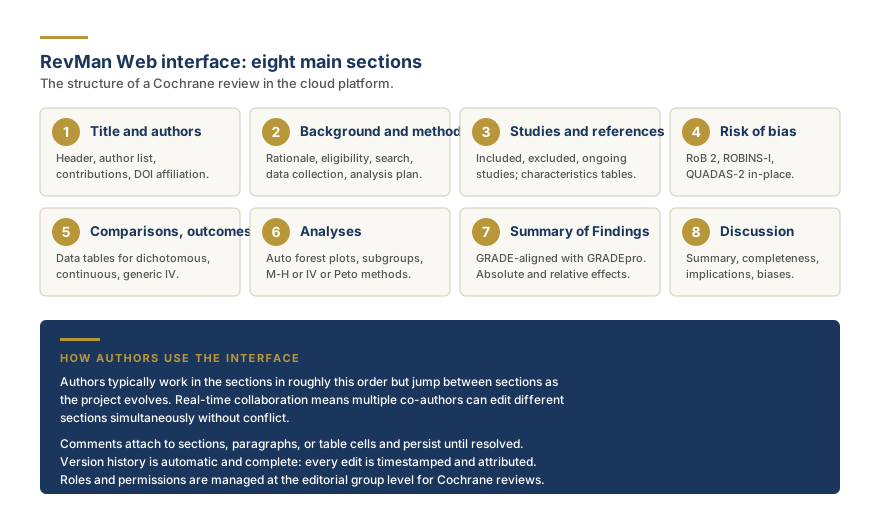
The eight main interface sections are title and authors, background and methods, studies and references, risk of bias, comparisons and outcomes, analyses, Summary of Findings, and discussion.
RoB 2, ROBINS-I, and QUADAS-2 are rendered in-place with signaling questions and domain judgments propagating to the published traffic-light figures.
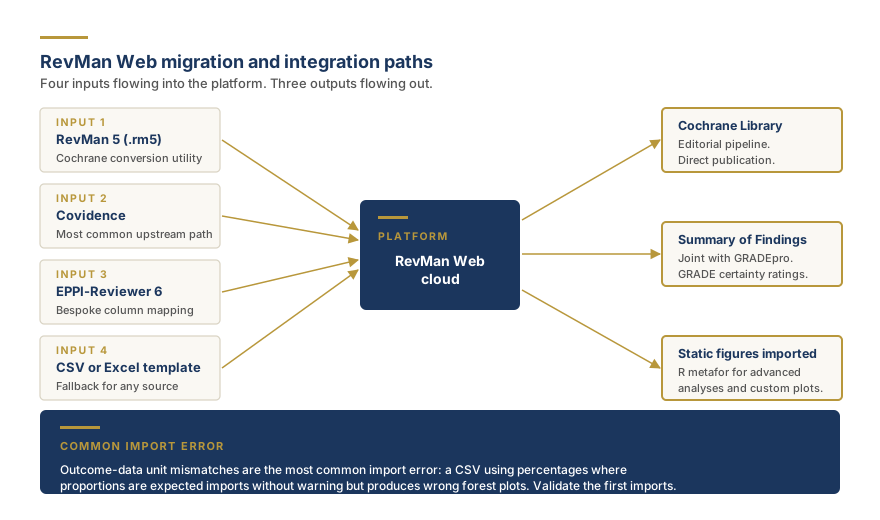
Imports are supported from RevMan 5 via the Cochrane conversion utility, from Covidence and EPPI-Reviewer 6 directly, and from CSV or Excel using the documented template.
Access is free for active Cochrane authors and available to non-Cochrane researchers through a paid institutional license, with bundled discounts for training programs and methods groups.
RevMan Web is Cochrane's cloud-based systematic review platform that replaces RevMan 5, providing collaborative editing, integrated risk-of-bias and GRADE support, and a direct path to publishing in the Cochrane Library. This walkthrough covers what changed in the move from desktop to cloud, how to access the platform, the navigation that matters in daily review work, the collaboration model, and the import paths from RevMan 5, Covidence, and EPPI-Reviewer 6. It is written for review teams that have committed to the Cochrane workflow and need to be productive in RevMan Web quickly, and for teams evaluating whether the platform is the right fit before committing.
What Changed When Cochrane Moved From Desktop to Cloud
The single most important change is that RevMan now lives in the browser. RevMan 5 ran locally on Windows, macOS, or Linux, stored reviews in proprietary .rm5 files on the reviewer's machine, and shared work between authors by emailing or syncing the file. RevMan Web stores the review on Cochrane servers, opens in any modern browser, and allows multiple authors to edit simultaneously.
The second change is that the platform is now actively maintained rather than legacy software. RevMan 5 reached end of active development in 2020 and has received only compatibility updates since. RevMan Web receives regular feature releases and bug fixes, and Cochrane has positioned the platform as the long-term home of Cochrane review production rather than a short-term replacement.
The third change is integration with adjacent Cochrane systems. RevMan Web connects directly to Cochrane's editorial management, to GRADEpro for Summary of Findings tables, and to the Cochrane Library publication pipeline. The friction that RevMan 5 authors experienced at the editorial stage, exporting files, uploading to Cochrane portals, reformatting for production, is largely absorbed inside RevMan Web.
The fourth change is updated risk-of-bias tooling. RevMan 5 supported the original Cochrane risk-of-bias tool but lacked native support for RoB 2, the second-generation tool that Cochrane now recommends for randomized trials. RevMan Web supports RoB 2 in-place, alongside ROBINS-I for non-randomized studies and QUADAS-2 for diagnostic accuracy studies, with the signaling questions and domain judgments rendered directly in the platform.
For Cochrane fundamentals on the software family that RevMan Web sits inside, see our companion piece on RevMan Cochrane fundamentals, which covers the licensing, history, and feature scope at the platform level.
Browser Support and Accessibility
RevMan Web is built for current versions of Chrome, Edge, Firefox, and Safari. Cochrane recommends keeping the browser updated to the most recent stable release, since the platform relies on modern web standards that older browsers do not fully implement.
The platform is designed to be accessible under the Web Content Accessibility Guidelines. Keyboard navigation is supported throughout the editing experience, screen-reader announcements are provided for state changes such as saved drafts and conflict resolution, and color contrast in the default theme meets the AA conformance level. Authors who need screen-reader workflows or keyboard-only navigation can produce a full Cochrane review without using a mouse.
The platform does not have an offline mode. RevMan Web requires a live connection to Cochrane servers, and authors who work in environments with intermittent connectivity should plan around that constraint. A short connection drop is handled gracefully with automatic reconnection and conflict-free merging when the connection is restored. Longer offline work requires either an alternative workflow or scheduling sessions around predictable connectivity.
The platform supports multiple language interfaces and is internally localized for the most common Cochrane author languages. The review content itself can be written in any language the editorial group accepts.
Account Access for Cochrane Authors and Non-Cochrane Users
For active Cochrane authors, account access is provided automatically through the Cochrane editorial group that owns the review. The same login that authenticates to the Cochrane Author Hub authenticates to RevMan Web, and authors are added to a specific review by the editorial group when the protocol is registered.
For non-Cochrane researchers, access is available through an institutional license that Cochrane sells to universities, training programs, and individual researchers. The institutional license provides the full RevMan Web feature set, including the risk-of-bias tooling and the Summary of Findings table support, but does not provide the editorial integration that is reserved for Cochrane reviews. Institutional licensees can produce a complete review in RevMan Web and export the output for submission to a non-Cochrane journal.
For training and short-term access, Cochrane provides limited free accounts through specific workshops and methods groups. These accounts have a defined expiration and are intended for hands-on practice rather than for production review work.
The single most common access confusion is what happens when a Cochrane author's editorial group reassigns or withdraws the review. The author's RevMan Web access for that specific review ends when the editorial relationship ends, although the author's general Cochrane account persists. For non-Cochrane teams the access is tied to the institutional license rather than to a specific review.
Navigating the RevMan Web Interface
RevMan Web's left sidebar organizes the review into eight main sections, each corresponding to a structural part of a Cochrane review. Authors typically work in the sections in roughly the order listed but jump between sections as the project evolves.
Title and authors. The review header, including title, author list, contact author, contributions of authors, and editorial group affiliation. This section is also where corrections, declarations of interest, and acknowledgments are entered.
Background and methods. The narrative sections at the top of the review, edited in a rich-text editor with citation support. These sections cover the rationale, the research question, the eligibility criteria, the search strategy summary, the data collection process, and the analysis methods.
Studies and references. The list of included studies, excluded studies, ongoing studies, and studies awaiting classification. Each study has a structured characteristics of included studies table with fields for methods, participants, interventions, outcomes, and notes.
Risk of bias. The risk-of-bias assessment for each included study, using RoB 2, ROBINS-I, or QUADAS-2 templates as appropriate for the study type. The signaling questions are rendered in-place and the domain-level judgments propagate to the summary figures.
Comparisons and outcomes. The structured analysis backbone of the review, organized as nested comparisons with one or more outcomes each. The data tables for each outcome accept dichotomous, continuous, or generic inverse-variance data depending on the outcome type.
Analyses. The forest plots, subgroup analyses, and sensitivity analyses generated automatically from the comparisons and outcomes section. Authors select the meta-analytical method (Mantel-Haenszel, inverse variance, Peto) per outcome, with fixed-effect or random-effects model selection.
Summary of Findings tables. The GRADE-aligned tables that integrate with GRADEpro to present absolute and relative effects with certainty ratings and footnotes. The tables can be generated entirely in RevMan Web for simple cases or built in GRADEpro and imported for complex cases.
Discussion and conclusions. The narrative sections at the bottom of the review, including the summary of main results, the overall completeness and applicability of evidence, the certainty of the evidence narrative, potential biases in the review process, and the implications for practice and research.
Real-Time Collaboration: Editing, Comments, and Version History
The collaboration model is the feature most likely to change daily working habits for review teams. Multiple authors can edit the review simultaneously, with changes appearing live in each author's browser. The platform handles conflict-free merging for non-overlapping edits and prompts for resolution when two authors edit the same content at the same time.
Comments can be attached to any section, paragraph, or table cell. A comment thread persists until it is resolved, which means review-level discussions about a specific data extraction or a specific risk-of-bias judgment are preserved alongside the content rather than scattered across email threads. Authors are notified by email when a comment is added or replied to on a section they have edited.
Version history is automatic and complete. Every edit is timestamped and attributed to the author who made it, and earlier versions of any section can be restored with a few clicks. This replaces the manual file-versioning that RevMan 5 authors maintained through naming conventions and shared folders.
Roles and permissions are managed at the editorial group level for Cochrane reviews and at the institutional level for non-Cochrane reviews. The standard roles include contact author, contributing author, and reviewer, each with appropriate edit, comment, and view permissions.
The collaboration features change the texture of team communication. With RevMan 5, weekly team meetings were typically the synchronization point. With RevMan Web, asynchronous review of edits and comments often replaces some of the synchronization meeting time, and the meetings shift toward decision-making rather than status updates.
Need professional help with your research?
Our PhD methodologists deliver complete systematic reviews and meta-analyses, from protocol to manuscript.
Risk-of-Bias Integration: RoB 2, ROBINS-I, QUADAS-2
The integrated risk-of-bias tooling is one of the most substantive feature additions over RevMan 5. The platform renders the appropriate template based on the study design and the review's risk-of-bias plan.
RoB 2 for randomized trials is the default for any included randomized study. The five domains, randomization, deviations from intended interventions, missing outcome data, measurement of the outcome, and selection of the reported result, are each rendered with their signaling questions, the algorithm-suggested judgment, and the reviewer's final judgment. The signaling questions and the domain judgments feed directly into the per-outcome traffic-light figures that appear in the published review.
ROBINS-I for non-randomized studies of interventions covers seven bias domains with signaling questions calibrated for observational designs. RevMan Web renders ROBINS-I in the same in-place format as RoB 2, with the additional complexity that ROBINS-I expects an explicit target trial framing for each comparison.
QUADAS-2 for diagnostic accuracy studies covers four domains, patient selection, index test, reference standard, and flow and timing. Each domain has signaling questions and produces a low, high, or unclear risk-of-bias judgment, with the first three domains also producing a separate applicability concern rating.
The integrated rendering changes the practical workflow significantly. RevMan 5 authors typically captured risk-of-bias judgments in an external spreadsheet and entered the final ratings into RevMan once. RevMan Web authors complete the assessment directly in the platform, with the signaling questions in front of them as they read the included study. The friction reduction increases the chance that the assessment captures the reviewer's reasoning rather than only the bottom-line judgment.
GRADEpro Integration for Summary of Findings Tables
RevMan Web includes a direct integration with GRADEpro, the dedicated GRADE software maintained by the GRADE working group. Authors can build the Summary of Findings table inside RevMan Web for straightforward cases and seamlessly hand off to GRADEpro for the more complex cases that need detailed footnotes, multiple comparisons, or extensive certainty-rating documentation.
The integration carries the data flow in both directions. Outcome data, effect estimates, and confidence intervals from the RevMan analyses populate the GRADEpro table automatically. Certainty ratings entered in GRADEpro flow back into the RevMan review for inclusion in the published manuscript.
The Summary of Findings table is one of the most reviewed parts of a Cochrane review by editors and peer reviewers, and the integration substantially reduces the manual work involved in keeping the table consistent with the underlying analyses. Authors who need a deeper treatment of GRADE certainty ratings should also consult the Cochrane Handbook reference chapters on assessing certainty and interpreting results.
Importing References from Covidence and EPPI-Reviewer 6
RevMan Web supports import from several upstream systematic review tools, which reduces the manual entry that has historically dominated the data extraction stage of Cochrane reviews.
Covidence is the most common upstream platform for Cochrane review teams, and the export from Covidence into RevMan Web is well supported. Included studies, study characteristics, and extracted outcome data flow from Covidence into the RevMan Web structure with relatively little manual cleanup. For teams comparing screening platforms, our roundup of Covidence alternatives and the Covidence vs Rayyan comparison cover the broader landscape.
EPPI-Reviewer 6 is a more flexible screening and extraction platform, particularly common in non-healthcare reviews and in mixed-methods reviews. EPPI-Reviewer 6 supports export formats that RevMan Web can consume, although the column mapping is more bespoke than the Covidence path.
Manual import from Excel or CSV is the fallback for any upstream tool that does not have a native RevMan integration. The CSV template that RevMan Web expects is documented in the platform's import dialog, and a small template workbook can be reused across studies.
The single most common import error is outcome-data unit mismatch. RevMan Web expects specific units depending on the outcome type, and a CSV that uses an unexpected unit (for example a percentage where a proportion is expected) will import successfully but produce wrong forest plots. Validate the imported data against the source study for the first few imports before trusting the import path at scale.
Migrating an Existing RevMan 5 File Into RevMan Web
For authors with existing RevMan 5 reviews, Cochrane provides a migration tool that converts the .rm5 file structure into a RevMan Web review. The migration preserves the review header, the narrative sections, the included and excluded studies lists, the characteristics tables, and the comparisons and outcomes structure.
What does not always migrate cleanly is the risk-of-bias content. RevMan 5 reviews built around the original Cochrane risk-of-bias tool produce ratings that do not have a one-to-one mapping into RoB 2. The migration tool preserves the original ratings as a legacy artifact, but reviews moving to RoB 2 will typically need to re-rate the included studies. The same applies to reviews moving between ROBINS-I versions or adding QUADAS-2 to a previously informal diagnostic accuracy assessment.
The practical migration workflow is to run the conversion, audit the output against the source review for completeness, re-do the risk-of-bias assessment if a methodological upgrade is required, validate the forest plots against the RevMan 5 version, and only then continue active editing in RevMan Web. For reviews under active update, the migration is best done at a natural breakpoint such as the start of an update cycle rather than mid-update.
Limitations Compared to RevMan 5 and the Roadmap
RevMan Web is not yet a complete superset of RevMan 5. A small number of legacy outcome types that RevMan 5 supported are not yet implemented in RevMan Web, and the platform's current capabilities should be verified against the training.cochrane.org documentation before committing to a workflow that depends on a specific feature.
Examples of features that have moved on different timelines include some advanced subgroup analysis configurations, certain non-standard effect measures, and specific cross-tabulation formats used in older diagnostic accuracy reviews. Cochrane has been transparent about the roadmap, and feature parity is the trajectory.
What RevMan Web has never supported, and what it is not expected to support, is the set of methodologically advanced features that RevMan 5 also did not support. Network meta-analysis, REML estimation, prediction intervals, Bayesian methods, and custom plots all require external tooling regardless of the RevMan generation. For these methods see our companion piece on meta-analysis in R, which covers the R-based workflow that complements RevMan for advanced analyses.
For non-Cochrane teams that want a more flexible platform, the broader RevMan alternatives landscape includes open-source, commercial, and code-based options. RevMan Web is not the only option, and it is not always the best option, depending on team skills and review scope.
RevMan Web Pricing and Institutional Access
For Cochrane authors, RevMan Web is free as part of Cochrane membership. The access is tied to active Cochrane review production and is administered through the editorial group that owns the review.
For non-Cochrane researchers, RevMan Web is available under an institutional license that Cochrane sells through a defined commercial channel. We do not quote current rates because the pricing changes and varies by institutional type and region. The license includes the full feature set, including RoB 2 integration, GRADEpro integration, and the editorial-management features that are reserved for Cochrane reviews are appropriately scoped.
For training programs and methods groups, Cochrane provides discounted bundled access that is well below the institutional license rate and that often makes RevMan Web a viable choice for thesis programs, residency research curricula, and short-term methods training.
The pricing model is one of the practical considerations that distinguishes RevMan from the commercial competitors. Some commercial systematic review platforms charge per-user per-month rates that accumulate across multi-year projects, while RevMan's licensing typically pairs with a longer-term institutional commitment.
When RevMan Web Fits and When It Does Not
RevMan Web is the right choice when the review is a Cochrane review, when the analysis is a standard aggregate meta-analysis of two-arm comparisons, when the team values the editorial integration with the Cochrane Library, and when the team has multiple authors who would benefit from real-time collaboration.
RevMan Web is also a reasonable choice for non-Cochrane reviews that want a structured platform with built-in risk-of-bias tooling and GRADE Summary of Findings tables, where the team has access to an institutional license and where the analysis falls within the standard methodological scope.
RevMan Web is not the right choice when the analysis requires methods the platform does not support, when the team has strong coding skills and prefers a script-based workflow that can be version-controlled outside the platform, when the review is methodologically experimental and needs flexibility the platform does not provide, or when the institutional license is not available and a free alternative is preferable.
For systematic review teams comparing RevMan Web against the broader landscape of meta-analysis tools, the decision tends to settle on Cochrane workflow integration as the dominant variable. Teams inside the Cochrane editorial system overwhelmingly use RevMan Web. Teams outside it weigh the institutional license cost against the methodological flexibility of R-based pipelines.
Frequently Asked Questions
How do I access RevMan Web?
For Cochrane authors, access is provided automatically when the editorial group adds you to a specific review. The same login that authenticates to the Cochrane Author Hub authenticates to RevMan Web. For non-Cochrane researchers, access is available through an institutional license that your institution or training program purchases from Cochrane. For short-term training and workshops, Cochrane occasionally provides time-limited free accounts. The full institutional license route is the path most non-Cochrane teams take when they want sustained access to the platform.
Is RevMan Web free?
RevMan Web is free for active Cochrane authors as part of Cochrane membership. For non-Cochrane users, the platform is available under a paid institutional license that Cochrane sells through a defined commercial channel. Training programs and methods groups can sometimes access discounted bundled rates. We do not quote current pricing because rates vary by institutional type and region. The Cochrane-author free license is one of the strongest practical arguments for choosing the Cochrane review pathway when the topic and team make it feasible.
Can I import RevMan 5 files into RevMan Web?
Yes. Cochrane provides a migration tool that converts the .rm5 file structure into a RevMan Web review, preserving the review header, narrative sections, included and excluded studies lists, characteristics tables, and comparisons and outcomes structure. Risk-of-bias content does not always migrate cleanly, particularly when moving from the original Cochrane risk-of-bias tool to RoB 2, and reviewers should plan to re-rate the included studies for methodological upgrades. The migration is best done at a natural breakpoint such as the start of an update cycle.
Does RevMan Web work offline?
No. RevMan Web requires a live connection to Cochrane servers and does not have an offline mode. A short connection drop is handled with automatic reconnection and conflict-free merging when the connection is restored. Longer offline work requires either an alternative workflow such as a local extraction spreadsheet that is imported when connectivity returns, or scheduling work sessions around predictable connectivity. Authors who routinely work in low-connectivity environments should plan around this constraint before committing to the platform.
What is the difference between RevMan Web and RevMan 5?
RevMan 5 is the legacy desktop application that runs locally on Windows, macOS, or Linux and stores reviews as .rm5 files. RevMan Web is the current cloud-based successor that runs in the browser, stores reviews on Cochrane servers, and supports real-time multi-author collaboration. RevMan Web is required for new Cochrane reviews and includes updated features such as native RoB 2 integration, GRADEpro integration, and direct editorial workflow connection. RevMan 5 reached end of active development in 2020 and is maintained only for compatibility.
Can I use RevMan Web for non-Cochrane reviews?
Yes, with an institutional license. The license includes the full RevMan Web feature set including the risk-of-bias tooling and the Summary of Findings table support, but does not include the editorial integration that is reserved for Cochrane reviews. Non-Cochrane institutional licensees produce a complete review in RevMan Web and export the output for submission to a non-Cochrane journal. For teams without an institutional license, open-source alternatives such as JASP, OpenMeta-Analyst, and R metafor cover the most common methodological needs.
Pro Tip
Validate imported outcome data against the source study for the first few imports to catch unit mismatches before they propagate to the forest plots.
Pro Tip
Re-rate risk-of-bias when migrating from RevMan 5 if you are upgrading to RoB 2: the original Cochrane risk-of-bias tool does not map one-to-one.
Pro Tip
Use real-time collaboration deliberately: agree which co-author owns each section and use comments rather than parallel edits to discuss changes.
Pro Tip
Build Summary of Findings tables inside RevMan Web for simple cases and hand off to GRADEpro for complex multi-comparison tables with extensive footnotes.
Pro Tip
Schedule the RevMan 5 migration at a natural breakpoint such as the start of an update cycle rather than mid-update.
Frequently Asked Questions
6
For Cochrane authors, access is provided automatically when the editorial group adds you to a specific review. The same login that authenticates to the Cochrane Author Hub authenticates to RevMan Web. For non-Cochrane researchers, access is available through an institutional license that your institution or training program purchases from Cochrane. For short-term training and workshops, Cochrane occasionally provides time-limited free accounts. The full institutional license route is the path most non-Cochrane teams take when they want sustained access to the platform.
RevMan Web is free for active Cochrane authors as part of Cochrane membership. For non-Cochrane users, the platform is available under a paid institutional license that Cochrane sells through a defined commercial channel. Training programs and methods groups can sometimes access discounted bundled rates. We do not quote current pricing because rates vary by institutional type and region. The Cochrane-author free license is one of the strongest practical arguments for choosing the Cochrane review pathway when the topic and team make it feasible.
Yes. Cochrane provides a migration tool that converts the .rm5 file structure into a RevMan Web review, preserving the review header, narrative sections, included and excluded studies lists, characteristics tables, and comparisons and outcomes structure. Risk-of-bias content does not always migrate cleanly, particularly when moving from the original Cochrane risk-of-bias tool to RoB 2, and reviewers should plan to re-rate the included studies for methodological upgrades. The migration is best done at a natural breakpoint.
No. RevMan Web requires a live connection to Cochrane servers and does not have an offline mode. A short connection drop is handled with automatic reconnection and conflict-free merging when the connection is restored. Longer offline work requires either an alternative workflow such as a local extraction spreadsheet that is imported when connectivity returns, or scheduling work sessions around predictable connectivity. Authors who routinely work in low-connectivity environments should plan around this constraint before committing to the platform.
RevMan 5 is the legacy desktop application that runs locally on Windows, macOS, or Linux and stores reviews as .rm5 files. RevMan Web is the current cloud-based successor that runs in the browser, stores reviews on Cochrane servers, and supports real-time multi-author collaboration. RevMan Web is required for new Cochrane reviews and includes updated features such as native RoB 2 integration, GRADEpro integration, and direct editorial workflow connection. RevMan 5 reached end of active development in 2020 and is maintained only for compatibility.
Yes, with an institutional license. The license includes the full RevMan Web feature set including the risk-of-bias tooling and the Summary of Findings table support, but does not include the editorial integration that is reserved for Cochrane reviews. Non-Cochrane institutional licensees produce a complete review in RevMan Web and export the output for submission to a non-Cochrane journal. For teams without an institutional license, open-source alternatives such as JASP, OpenMeta-Analyst, and R metafor cover the most common methodological needs.
Share
Found this useful? Share it with your colleagues.
Need professional help with your research?
Our PhD methodologists deliver complete systematic reviews and meta-analyses, from protocol to manuscript.
From protocol to publication-ready manuscript. Our PhD-level methodologists handle systematic reviews, meta-analyses, scoping reviews, and more. Most projects deliver in under 2 weeks.
Our promise: Free rework on search, screening, or synthesis if reviewers push back.
4.9 / 5Quote within a few hoursPRISMA 2020 + Cochrane HandbookPhD methodologistConfidential by default
Dr. Sarah Mitchell holds a PhD in Biostatistics from Johns Hopkins Bloomberg School of Public Health and has over 15 years of experience in systematic review methodology and meta-analysis. She has authored or co-authored 40+ peer-reviewed publications in journals including the Journal of Clinical Epidemiology, BMC Medical Research Methodology, and Research Synthesis Methods. A former Cochrane Review Group statistician and current editorial board member of Systematic Reviews, Dr. Mitchell has supervised 200+ evidence synthesis projects across clinical medicine, public health, and social sciences.
From protocol to publication-ready manuscript. Our PhD-level methodologists handle systematic reviews, meta-analyses, scoping reviews, and more. Most projects deliver in under 2 weeks.
CHEERS 2022 checklist explained: all 28 items, what changed from CHEERS 2013, and how to report a cost-effectiveness analysis so payers and journals can use it.
SPIRIT 2025 checklist explained: all 34 items by section, what changed from SPIRIT 2013, and how the protocol lines up with CONSORT 2025 when you report the trial.
ARRIVE 2.0 guidelines explained: the Essential 10 and the Recommended Set, what changed from ARRIVE 2010, and the items journals check in animal research reports.