PRISMA flow diagram template, 2020 vs 2009 differences, tools to build it, numbers to report, exclusion reasons, and common errors to avoid before submission.
Dr. Sarah Mitchell
May 13, 2026
Key Takeaways
The PRISMA flow diagram is required by all journals endorsing PRISMA reporting standards. It documents records identified, screened, assessed for eligibility, excluded with reasons, and finally included. Use the PRISMA 2020 template, not the 2009 template, for any review published from 2022 onward.
PRISMA 2020 distinguishes records (database entries) from reports (published documents) from studies (scientific investigations). The diagram tracks records during identification and screening, reports during eligibility, and studies at the inclusion node. One study can have multiple reports.
PRISMA 2020 splits identification into two parallel branches: records from databases and registers (the structured-search route) and records from other methods (citation searching, hand-searching, author contact, grey literature). Both branches must be reported separately when used.
The reasons-for-exclusion block at the eligibility phase is the most-scrutinized part of the diagram. Every report excluded at full-text review must be categorized with a specific reason (wrong design, wrong population, wrong intervention, wrong comparator, wrong outcome, conference abstract only).
Build the diagram with the prisma2020.com Shiny app (free, web-based, PDF + SVG + PowerPoint export), the official Microsoft Word or PowerPoint template, draw.io or Lucidchart for custom layouts, or PRISMA-tikz for LaTeX manuscripts. The numbers in the diagram must match the manuscript prose exactly.
The PRISMA flow diagram is a four-phase visual that documents how records are identified, screened, assessed for eligibility, and finally included in a systematic review, providing a transparent accounting of every record entering the pipeline and every reason for exclusion at the full-text stage. The diagram is required by all journals that endorse the PRISMA reporting standard, expected by peer reviewers as a standalone evidence of methodological transparency, and used by readers as the single fastest way to judge whether a review's selection process was reproducible. This guide covers the anatomy of the PRISMA 2020 diagram, the differences from the older PRISMA 2009 version, the official tools for building it, the numbers reviewers most often get wrong, and the placement and styling conventions that journals expect in 2026.
The diagram itself is a visual instrument. The numbers it carries are the load-bearing content. A diagram that looks pretty but reports numbers that contradict the PRISMA 2020 reporting checklist elsewhere in the manuscript fails the transparency standard that the diagram exists to enforce. Reviewers writing manuscripts should treat the flow diagram and the checklist as a coupled pair, never one without the other.
Pair your flow diagram with the rest of the review's working files in the PRISMA template pack.
PRISMA 2020 Versus PRISMA 2009: What Changed and Why
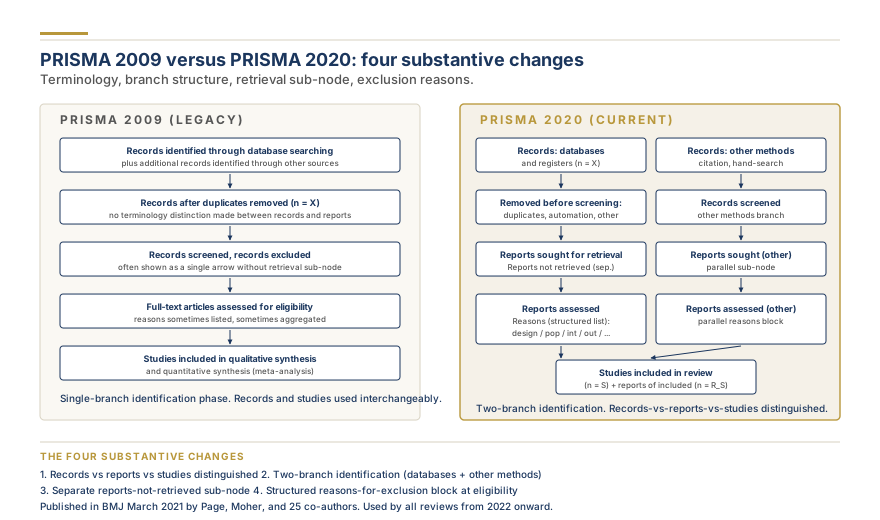
The original PRISMA 2009 flow diagram was a four-phase chart: identification, screening, eligibility, included. Records came in from databases and other sources, duplicates were removed, abstracts were screened, full texts were assessed, and the final included set fed into the synthesis. The structure has been retained in 2020 but the diagram has changed in three substantive ways that reviewers must implement.
The terminology distinction between records and reports. In PRISMA 2009 the word "studies" or "records" was used loosely throughout the diagram. PRISMA 2020 distinguishes records (individual bibliographic entries returned by a database search) from reports (the published documents a record points to: journal articles, conference papers, preprints, theses, grey literature). The distinction matters because a single study can have multiple reports (a primary publication, a conference abstract, a thesis, a follow-up extension), and multiple records can point to the same report (different database indexing of the same paper). The 2020 diagram tracks records during identification and screening, then reports during eligibility, and studies at the inclusion node.
The database-and-register branch versus the other-methods branch. The 2020 diagram explicitly splits the identification phase into two parallel columns: one column for records identified from databases and trial registers (the structured-search route) and a separate column for records identified from other methods (citation searching, hand-searching reference lists, contacting authors, organizational websites, social media). Each branch tracks its own records, screened counts, full-text assessments, and exclusions, with the two streams converging only at the final included node. The split addresses a long-standing criticism that the 2009 diagram pooled the two routes and obscured the contribution of each source.
Optional sub-fields and updated guidance for living reviews and updates. The 2020 diagram template provides optional fields for records identified from previous version of the review (when the review is an update) and supports living-review reporting where additional records are tracked in cumulative updates. The complete narrative of what changed between the two PRISMA versions appears in the dedicated what changed in the PRISMA 2020 update guide; the present discussion is limited to the flow diagram specifically.
The PRISMA 2020 statement was published in BMJ in March 2021 by Matthew Page, David Moher, and 25 co-authors, and the flow diagram template was released alongside the statement at the official prisma-statement.org website. Reviews completed before 2021 used the 2009 template and were correct to do so at the time. Reviews published in 2026 are expected to use the 2020 diagram unless a methodological reason demands otherwise.
Anatomy of the 2020 Diagram
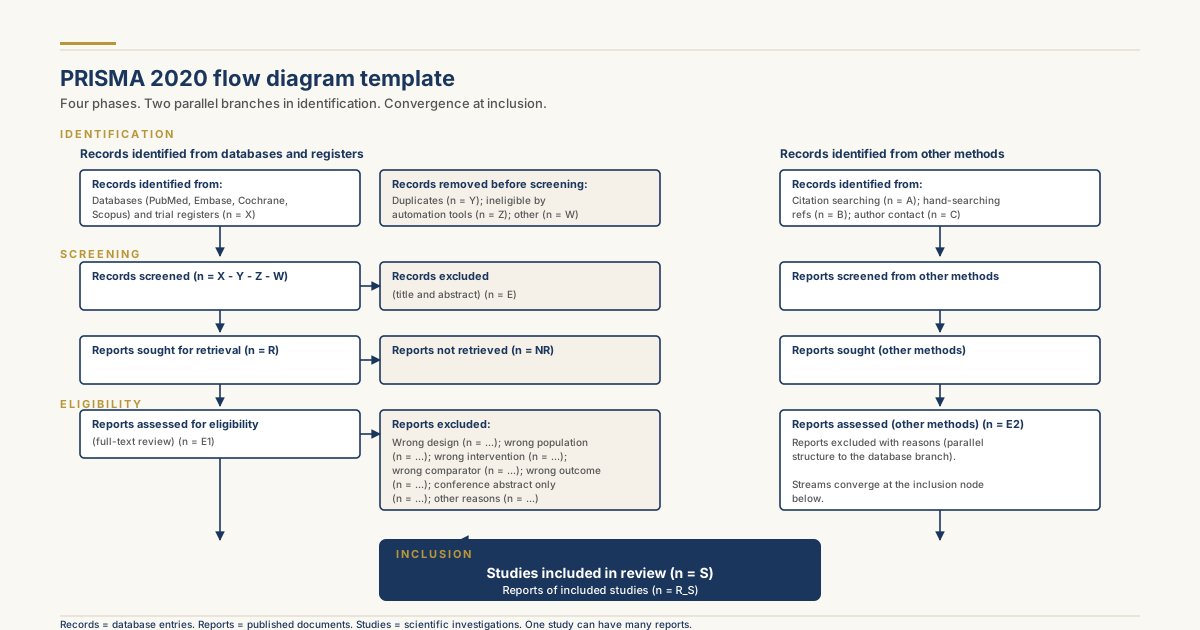
The 2020 diagram has three horizontal phases (identification, screening, included) and two parallel vertical branches (databases and registers, other methods). Each cell in the matrix corresponds to a specific count that must appear somewhere in the manuscript or appendices.
Identification phase, left branch (databases and registers). Two boxes. The first reports the number of records identified from each database and register, broken down by source (PubMed n = 1,234; Embase n = 2,456; Cochrane CENTRAL n = 567; total n = 4,257). The second reports the number of records removed before screening, with sub-categories for duplicates removed, records marked ineligible by automation tools (machine learning de-duplication, language filter), and records removed for other reasons (book chapters, editorials, if pre-screening filtered them).
Identification phase, right branch (other methods). A single box reporting the number of records identified from other methods, with optional sub-categories for citation searching (forward and backward), grey literature, contacting authors, organizational websites, and other named sources. The 2020 template lists the standard categories but reviewers can add custom rows for unusual sources.
Screening phase, both branches. Two boxes per branch. The first reports the number of records screened (title and abstract) and the number of records excluded at this stage. The second reports the number of reports sought for retrieval (i.e., full texts the reviewers attempted to obtain) and the number of reports not retrieved (full texts unavailable despite inter-library loan and author contact). The distinction is important: a reviewer who excluded a record at screening because the abstract clearly failed the eligibility criteria is in a different position than a reviewer who could not find the full text at all.
Eligibility phase, both branches. Two boxes per branch. The first reports the number of reports assessed for eligibility (full-text review). The second reports the number of reports excluded with a structured list of reasons (wrong study design, wrong population, wrong intervention, wrong comparator, wrong outcome, conference abstract only, full text in unsupported language, retracted). Each reason gets its own count.
Included phase, convergence node. The two branches merge at the final box, which reports the number of studies included in review and the number of reports of included studies. A study with two reports (primary publication plus follow-up) counts as one study but two reports. The 2020 standard reports both.
The Three Official 2020 Variants
The PRISMA 2020 statement publishes three official flow-diagram templates. Reviewers must pick the one that matches the review type, not the one that looks easiest.
Variant 1: New searches only. The standard four-phase diagram with the two-branch identification (databases-and-registers plus other-methods). Used for first-time systematic reviews where no prior version exists.
Variant 2: New searches plus updates. Adds a column for records identified from a previous version of the review, with sub-rows for studies included previously, studies excluded previously, and new records identified by the update search. Used when the review is an update of an existing published review.
Variant 3: Living reviews and scoping reviews. The PRISMA-ScR (Scoping Review) extension has its own PRISMA-ScR for scoping reviews variant with a simplified flow diagram that does not require reasons for exclusion at the eligibility phase (since scoping reviews do not formally exclude on quality grounds). Living systematic reviews track records cumulatively across multiple update cycles.
Numbers You Must Report at Each Node
A reviewer auditing a flow diagram should be able to add the numbers and arrive at internally consistent totals. The arithmetic that must hold:
Records identified - records removed before screening = records screened. If 4,257 records were identified and 1,341 duplicates were removed, then 2,916 records must appear at the screening node.
Records screened - records excluded at title/abstract = reports sought for retrieval. If 2,916 records were screened and 2,612 were excluded at title and abstract, then 304 reports must have been sought for retrieval.
Reports sought - reports not retrieved = reports assessed for eligibility. If 304 reports were sought and 18 could not be retrieved, then 286 reports must appear at the eligibility node.
Reports assessed - reports excluded = reports of included studies. If 286 reports were assessed and 248 were excluded, then 38 reports correspond to included studies, which may collapse to (say) 32 unique included studies after merging multiple reports of the same study.
The arithmetic must hold in both branches separately and in the merged inclusion node. A discrepancy of one record is acceptable (rounding in totals reported across sources); a discrepancy of more than that is a red flag.
Reasons for Exclusion at the Full-Text Phase
The exclusion-with-reasons block at the eligibility phase is the most-scrutinized part of the diagram. The 2020 standard requires that every report excluded at full-text review be categorized by reason, with at least one reason per report and a count per reason. The typical reason categories:
Wrong study design (e.g., a narrative review when only original studies are eligible). Wrong population (e.g., paediatric studies when adults were the target). Wrong intervention (e.g., a different drug class). Wrong comparator (e.g., active control when placebo was specified). Wrong outcome (e.g., a surrogate marker when the protocol required clinical endpoints). Wrong setting (e.g., outpatient when only inpatient was eligible). Wrong language (when language was an exclusion criterion). Conference abstract only (no full report available). Duplicate publication (same data as an included study). Retracted publication. Pre-print not peer-reviewed (if the protocol excluded preprints). Insufficient data for extraction (the paper was eligible by criteria but did not report the data needed for synthesis).
The categories used should match the inclusion and exclusion criteria stated in the methods section and the protocol. A reviewer who lists a reason in the flow diagram that was not in the protocol is signalling a post hoc decision that needs to be disclosed. The narrative of the methods section should briefly explain how the reasons were assigned. The methods section walkthrough with PRISMA covers the prose framing.
Need help with your systematic review?
Our team builds comprehensive search strategies, handles screening across databases, and delivers PRISMA 2020-compliant systematic reviews.
The most common source of confusion in PRISMA 2020 diagrams is the records-versus-reports distinction at the eligibility node. Three principles resolve almost all cases.
Principle one: a record is a database hit. The same paper can produce two records if it appears in PubMed and Embase. The same record can never produce two papers.
Principle two: a report is a published document. A study can have multiple reports (primary publication, follow-up, conference abstract, thesis). A report can describe multiple studies (rare, but happens in cross-cutting publications). Reports are what reviewers obtain at the retrieval step.
Principle three: a study is the underlying scientific investigation. One study, one entry in the included set. The number of studies included is the load-bearing count for synthesis decisions (how many studies enter meta-analysis, how many enter qualitative synthesis).
For preprints the 2020 guidance is permissive: preprints are reports that may or may not be peer-reviewed. If the protocol permits preprints, they appear as records, as reports, and contribute to included studies on equal footing. If the protocol excludes preprints, the preprint is excluded at the eligibility node with the reason "not peer-reviewed." The protocol decision should be documented in the PRISMA-P protocol checklist and aligned with the flow diagram's exclusion logic.
For grey literature (technical reports, government publications, dissertations, conference proceedings) the same logic applies: include or exclude per the protocol, and document the decision at the relevant node.
Building the Diagram: Tools
Five tools dominate PRISMA 2020 flow-diagram construction in 2026 practice.
The official Microsoft Word template. The PRISMA Group distributes a Word document with the boxes and arrows pre-drawn; reviewers type their numbers into the boxes. The result is editable, lightweight, and renders well in submission PDFs. The downside is the diagram is locked to the Word page layout, and resizing for journal-specific column widths can break the alignment.
The official PowerPoint template. Same content as the Word template but built in PowerPoint, which gives slightly better resize behavior and is what most reviewers use when the figure needs to fit a tight one-column layout.
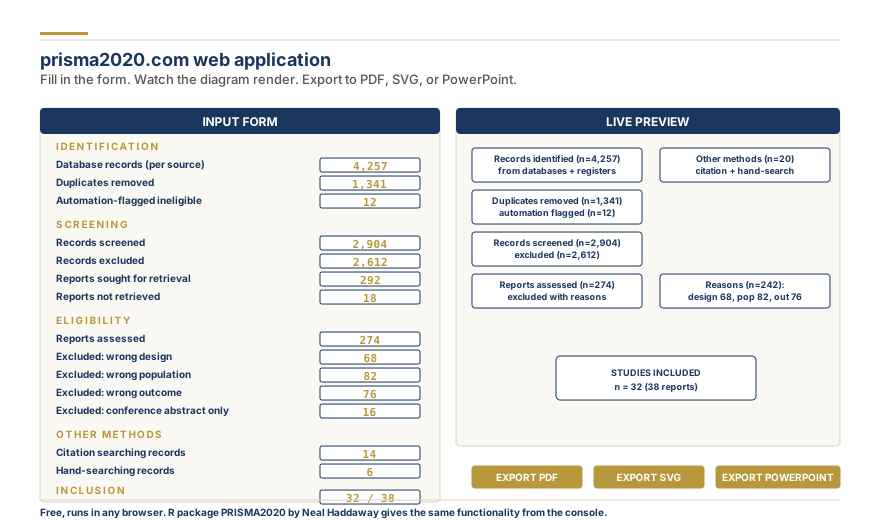
prisma2020.com Shiny app: input fields, preview, and export formats
The prisma2020.com Shiny app. A web-based interactive tool by Neal Haddaway and colleagues at prisma2020.com. The user fills in the numbers in a form and the app generates the diagram in PDF, SVG, or PowerPoint formats. The output is publication-ready and the formatting matches the official PRISMA template exactly. The tool is free, runs in any web browser, and is currently the most-used building tool among PhD students. The R package PRISMA2020 by the same author provides the same functionality from the R console for reproducible workflows.
Draw.io and Lucidchart. Generic diagram-editing tools that can produce a custom PRISMA flow diagram if the official template is unsuitable for a specific journal. These are slower than the Shiny app but allow non-standard customization (multi-row sub-categories of exclusion reasons, color coding of branches, additional review-specific notes). Outputs export to PNG, PDF, or SVG.
LaTeX with TikZ. For reviewers writing in LaTeX (especially in mathematics, statistics, computer science, and physics), the PRISMA-tikz package draws the 2020 flow diagram with TikZ commands. Source-controlled, reproducible, and integrates with the manuscript's typography.
Style Notes for Publication
The official PRISMA template specifies the arrow direction (top to bottom, with horizontal arrows at branch convergences), the box outline style (single black line, 1 to 1.5 point weight), and the typography (sans-serif font, ten or eleven point body text, bold for box headers). Journals occasionally request changes: a few demand grayscale output (no color), some prefer the diagram in a separate Methods Supplement rather than the main text, and a few specify a maximum size (typically half a page or one column). Check the journal's author guidelines before finalizing the figure.
Color choices. The official template uses light gray for the database-and-register branch and white for the other-methods branch. Colored versions of the diagram (e.g., navy for the main branch, gold for the other-methods branch) are acceptable in some journals but get rejected by Cochrane and several traditional medical journals; the safe default is the grayscale official template.
Resolution. Submit the flow diagram as a vector format (PDF, SVG, or EPS) rather than a raster format (PNG, JPEG) whenever the journal accepts vector. Vector formats remain crisp at any zoom level; raster formats pixelate when the journal typesetting team rescales the figure.
Placement in the Manuscript and Protocol
The PRISMA 2020 flow diagram belongs in the Results section of the systematic review manuscript, typically as the first figure (Figure 1) after a paragraph describing the search and selection process. Some journals place it in the Methods section instead; check the journal's instructions. In the protocol (PROSPERO registration or pre-registered Methods document), a template flow diagram with placeholder numbers can be included or omitted; the protocol's load-bearing element is the inclusion and exclusion criteria, not the diagram itself. The protocol-stage PRISMA-P reporting standard covers what belongs at the protocol stage.
In the abstract, the flow diagram is not included (abstracts are text-only), but the key numbers (records identified, studies included, reports excluded) appear in narrative form per the PRISMA abstract checklist.
PRISMA 2009 versus 2020: side-by-side structural comparison
Common Errors Reviewers Make
The errors below are the ones that most often trigger peer-review comments or rejection on methodological grounds.
Missing duplicates-removed box. Reviewers occasionally jump from "records identified" straight to "records screened" without showing the duplicates removed. This is a 2020-template requirement: the duplicates count must appear as its own labelled box.
Conflating screening and eligibility. The title-and-abstract screening phase and the full-text eligibility phase are distinct nodes. Combining them into one box ("records screened and excluded") loses the audit trail and is non-compliant with the 2020 template.
Mismatch between diagram counts and manuscript text. The diagram says "32 studies included," but the manuscript Results say "33 studies included" or the synthesis table lists 31. Every count in the diagram should appear identically in the manuscript prose and in the synthesis tables.
Decimal-point typos. The most embarrassing error: "1,234 records" in the database row but "1.234 records" elsewhere, or "n = 32" in one row and "n = 23" in another due to digit transposition. Proofread the numbers letter by letter.
Reasons for exclusion that exceed reports excluded. If 248 reports were excluded and the reasons list "wrong design n = 80, wrong population n = 90, wrong outcome n = 90, wrong language n = 30," the reasons sum to 290, not 248. Either each report has one and only one reason (total reasons = total exclusions) or each report can have multiple reasons (totals exceed exclusions and the diagram footnote must state this).
Numbers in diagram disagree with numbers in PROSPERO update. The flow diagram is the canonical accounting; if PROSPERO has different numbers, the PROSPERO entry should be updated rather than the diagram fudged.
Missing other-methods branch when used. If hand-searching, citation searching, or contacting authors produced any records, the other-methods branch must appear. Omitting it because "only one additional study was found" is incorrect.
Missing reports-not-retrieved sub-node. Reviewers sometimes treat all reports as retrievable. If even one report could not be obtained despite inter-library loan, it must appear in the "reports not retrieved" box; otherwise the eligibility count appears inflated relative to the reports actually assessed.
Updating the Diagram When Peer Review Demands Additional Searches
Peer reviewers frequently request that the search be re-run, broadened to additional databases, or extended to a more recent date. The flow diagram must be updated. The 2020 template supports this through a sub-row indicating the additional records from updated search, which is added to the original records-identified count, with the new screening and eligibility paths traced through to the included node. The methods section should note when the update was performed (e.g., "the search was re-run on 1 April 2026 in response to peer review") and the diagram's footnote should reference this. The narrative of the search strategy should be updated correspondingly.
Living Systematic Reviews and Cumulative Diagrams
Living systematic reviews are a 2020-era innovation: the review is updated continuously as new evidence appears, rather than as a single one-off effort. The PRISMA 2020 flow diagram for a living review tracks records identified in the original search separately from records identified in each subsequent update cycle, with cumulative counts at the inclusion node. The official template provides a column structure for this. The Cochrane Living Evidence working group has published guidance on how to present living-review diagrams in the manuscript and in the trial-registry-style living-review platforms; the diagram is typically updated quarterly or whenever a new included study is added.
Frequently Asked Questions
What is a PRISMA flow diagram?
The PRISMA flow diagram is a standardized four-phase visual that documents how records progress through a systematic review: identification (database searches and other methods), screening (title and abstract), eligibility (full-text review with reasons for exclusion), and included (final set of studies feeding synthesis). The diagram is required by all journals endorsing PRISMA reporting standards and provides transparent accounting of every record entering the pipeline and every report excluded at the full-text stage.
How do I make a PRISMA flow diagram?
Use one of five tools: the official Microsoft Word template from prisma-statement.org, the official PowerPoint template, the prisma2020.com Shiny web app (most popular among graduate students, free and produces publication-ready PDF, SVG, and PowerPoint exports), generic diagram editors like draw.io or Lucidchart for custom layouts, or LaTeX with the PRISMA-tikz package for reviewers writing in LaTeX. Whichever tool you choose, the numbers in the diagram must match the numbers in your manuscript prose and synthesis tables exactly.
What is the latest PRISMA flow diagram?
The current standard is the PRISMA 2020 flow diagram, published in BMJ in March 2021. It supersedes the PRISMA 2009 diagram. The 2020 template distinguishes records from reports, splits identification into a database-and-register branch and an other-methods branch, and includes optional variants for review updates and scoping reviews (PRISMA-ScR). Reviews published in 2026 should use the 2020 diagram.
What is included in a PRISMA flow chart?
A PRISMA 2020 flow chart includes: records identified from databases and registers (with per-source breakdown), records removed before screening (duplicates, automation tools, other), records screened, records excluded at title and abstract, reports sought for retrieval, reports not retrieved, reports assessed for eligibility, reports excluded with structured reasons, records identified from other methods, and the final count of studies and reports included in the review. Numbers must be internally consistent and match the manuscript.
What is the difference between PRISMA 2009 and PRISMA 2020 flow diagrams?
PRISMA 2020 distinguishes records (database entries) from reports (published documents), explicitly splits identification into database-and-register and other-methods branches, supports variants for review updates and living reviews, includes a separate sub-node for reports not retrieved, and standardizes the reasons-for-exclusion block at the eligibility phase. PRISMA 2009 used "records" loosely throughout, pooled identification sources, and did not distinguish reports from records.
Where do you put a PRISMA flow diagram?
In the systematic review manuscript, the PRISMA flow diagram belongs in the Results section, typically as Figure 1 after a paragraph describing the search and selection process. Some journals place it in the Methods section; check the journal's author guidelines. In the protocol (PROSPERO or PRISMA-P), the diagram is usually omitted or shown as a template with placeholders. In the abstract, the diagram is not included but the key numbers (records identified, studies included) appear in narrative form per the PRISMA abstract checklist.
Pro Tip
Use the PRISMA 2020 template (not the 2009 template) for any systematic review submitted to a journal in 2026. Reviews using the 2009 template will be flagged by methodological reviewers.
Pro Tip
Use prisma2020.com (the official Shiny web app) or the R PRISMA2020 package to generate publication-ready diagrams in PDF, SVG, or PowerPoint formats. Both are free and produce diagrams matching the official template.
Pro Tip
Verify arithmetic on the diagram before submission: records identified minus duplicates equals records screened; records screened minus excluded equals reports sought; reports sought minus not retrieved equals reports assessed; reports assessed minus excluded equals reports of included studies.
Pro Tip
Categorize every full-text exclusion with a specific reason matching the protocol's inclusion and exclusion criteria. Aggregate exclusion counts without reason breakdowns will trigger reviewer comments about transparency.
Pro Tip
Submit the diagram as a vector format (PDF, SVG, or EPS) when the journal accepts vector, not a raster format (PNG, JPEG). Vector remains crisp when typesetters rescale; raster pixelates.
Frequently Asked Questions
6
The PRISMA flow diagram is a standardized four-phase visual that documents how records progress through a systematic review: identification (database searches and other methods), screening (title and abstract), eligibility (full-text review with reasons for exclusion), and included (final set of studies feeding synthesis). The diagram is required by all journals endorsing PRISMA reporting standards and provides transparent accounting of every record entering the pipeline and every report excluded at the full-text stage.
Use one of five tools: the official Microsoft Word template from prisma-statement.org, the official PowerPoint template, the prisma2020.com Shiny web app (most popular among graduate students, free and produces publication-ready PDF, SVG, and PowerPoint exports), generic diagram editors like draw.io or Lucidchart for custom layouts, or LaTeX with the PRISMA-tikz package for reviewers writing in LaTeX. Whichever tool you choose, the numbers in the diagram must match the numbers in your manuscript prose and synthesis tables exactly.
The current standard is the PRISMA 2020 flow diagram, published in BMJ in March 2021. It supersedes the PRISMA 2009 diagram. The 2020 template distinguishes records from reports, splits identification into a database-and-register branch and an other-methods branch, and includes optional variants for review updates and scoping reviews (PRISMA-ScR). Reviews published in 2026 should use the 2020 diagram.
A PRISMA 2020 flow chart includes: records identified from databases and registers (with per-source breakdown), records removed before screening (duplicates, automation tools, other), records screened, records excluded at title and abstract, reports sought for retrieval, reports not retrieved, reports assessed for eligibility, reports excluded with structured reasons, records identified from other methods, and the final count of studies and reports included in the review. Numbers must be internally consistent and match the manuscript.
PRISMA 2020 distinguishes records (database entries) from reports (published documents), explicitly splits identification into database-and-register and other-methods branches, supports variants for review updates and living reviews, includes a separate sub-node for reports not retrieved, and standardizes the reasons-for-exclusion block at the eligibility phase. PRISMA 2009 used 'records' loosely throughout, pooled identification sources, and did not distinguish reports from records.
In the systematic review manuscript, the PRISMA flow diagram belongs in the Results section, typically as Figure 1 after a paragraph describing the search and selection process. Some journals place it in the Methods section; check the journal's author guidelines. In the protocol (PROSPERO or PRISMA-P), the diagram is usually omitted or shown as a template with placeholders. In the abstract, the diagram is not included but the key numbers appear in narrative form per the PRISMA abstract checklist.
Share
Found this useful? Share it with your colleagues.
Need help with your systematic review?
Our team builds comprehensive search strategies, handles screening across databases, and delivers PRISMA 2020-compliant systematic reviews.
Building Your Search Strategy? We Can Run the Whole Review.
From protocol to PRISMA flow diagram, our PhD team handles database searches, screening, data extraction, and a publication-ready manuscript. Every step, done right.
Our promise: Free rework on search, screening, or synthesis if reviewers push back.
4.9 / 5Quote within a few hoursPRISMA 2020 + Cochrane HandbookPhD methodologistConfidential by default
Dr. Sarah Mitchell holds a PhD in Biostatistics from Johns Hopkins Bloomberg School of Public Health and has over 15 years of experience in systematic review methodology and meta-analysis. She has authored or co-authored 40+ peer-reviewed publications in journals including the Journal of Clinical Epidemiology, BMC Medical Research Methodology, and Research Synthesis Methods. A former Cochrane Review Group statistician and current editorial board member of Systematic Reviews, Dr. Mitchell has supervised 200+ evidence synthesis projects across clinical medicine, public health, and social sciences.
Building Your Search Strategy? We Can Run the Whole Review.
From protocol to PRISMA flow diagram, our PhD team handles database searches, screening, data extraction, and a publication-ready manuscript. Every step, done right.
CHEERS 2022 checklist explained: all 28 items, what changed from CHEERS 2013, and how to report a cost-effectiveness analysis so payers and journals can use it.
SPIRIT 2025 checklist explained: all 34 items by section, what changed from SPIRIT 2013, and how the protocol lines up with CONSORT 2025 when you report the trial.
ARRIVE 2.0 guidelines explained: the Essential 10 and the Recommended Set, what changed from ARRIVE 2010, and the items journals check in animal research reports.